A lot of folks we talk to ask us how Algolia retrieval actually works under the hood. The answers are spread out across our docs and blog posts, so it takes some effort to piece together the whole story. In this post, we’ll pull those pieces into one clear, end-to-end walkthrough of the process that kicks off when a user types a query into an Algolia search box. And to help make the process clearer, we’ll compare it along the way to the way detectives follow up on a tip from a witness.
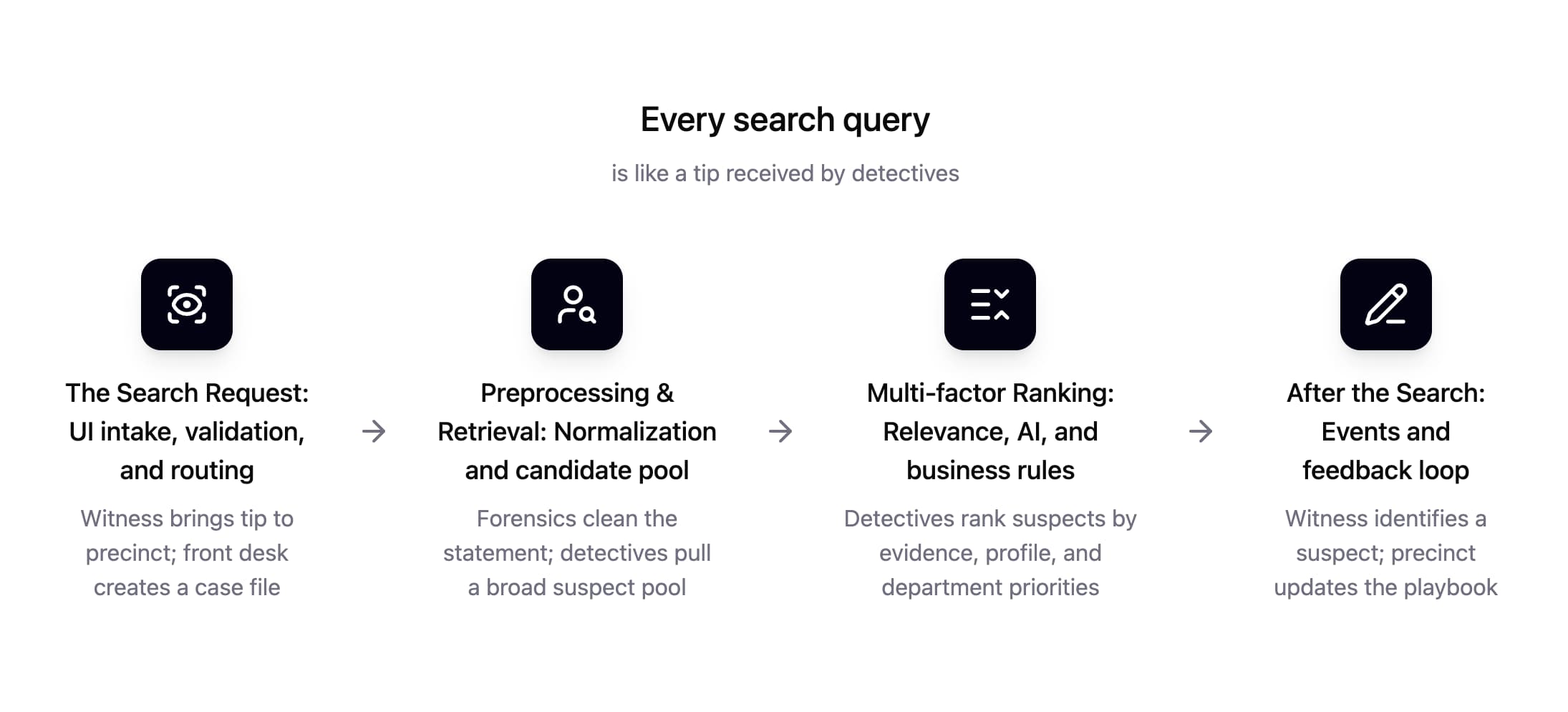
We’ll break it down more later, but here’s the general flow:
Phase 1: The search request (UI intake, validation, and routing)
The front desk at the precinct accepts tips and leads from witnesses. Without this crucial step working smoothly, the investigation never gets off the ground. Our frontend UI is a lot like this — it accepts the keystroke inputs from the user and builds a structured request that the backend server acts on.
How it goes about doing this, though, is customizable. InstantSearch (our set of frontend libraries built to make this process easier) can wait to build that structured request until the user has stopped typing, reducing the visual flashes the user is subjected to, or you can set it to just search as they type, refining the results on every keystroke. Search-as-you-type feels snappier, but it comes at a cost: queries whose results are useless in milliseconds pile up, and all of those count toward your bill. That doesn’t matter much to smaller sites which may never use up the quota on the free plan, but for applications with bigger user bases, it could save quite a bit to debounce those search requests just a few milliseconds. Average typing speed is about 3 characters per second, so an artificial delay of 200ms won’t degrade the user experience at all.
InstantSearch builds the structured request just like a case file. It includes the query itself, along with refinements, pagination details, and other important values:
clickAnalytics — this key in the request tells the backend to generate an ID for this query, which is useful to reference it later
userToken — this key defines a stable, anonymous ID for the user (or witness) so we can learn over time how best to treat requests from them
Once that “case file” makes it to the backend, it checks that the request is valid, allowed, and came from the right frontend using permissions connected to the Algolia API key it used. For the quickest response, the request is routed to the nearest region where Algolia has servers.
Phase 2: preprocessing & retrieval (normalization and candidate pool)
Once the validated, attributed case file enters the engine, it’s time for Algolia to convert that messy, imperfect query into searchable markers. This step is called preprocessing, and it’s not far off from what they’re doing in the precinct. Forensics will need to clean the witness statement, removing typos and grammatical errors, expanding aliases of potential suspects, and isolating hard constraints that limit the pool of potential suspects.
This phase isn’t about who did it; it’s about who could have done it. We’re not trying to find the one record the user is looking for, but instead generate a pool of records that could potentially match their query — we’ll rank them later. The metric which measures how much of the relevant documents in the index that are successfully retrieved is called recall, and how many of those retrieved documents are actually relevant is called precision. Our retrieval algorithm works to optimize both of those metrics using a few specialized natural language processing (NLP) techniques:
Typo tolerance: When the query string looks like a misspelling of the result, still retrieve the intended items.
Synonyms: Include two-way equivalent terms (like “pants” and “trousers”) and one-way subset descriptions (like how searches for “console” should return PlayStations and others, but searches for “PlayStation” should not return all results for “console”).
Stop-word removal: Strip high-frequency low-signal words (like “the”, “a”, “is”, “on”, etc.) that don’t contribute any meaning to the query.
Facet tagging: Detect if parts of the query can be mapped to facet values, so we can remove any records that don’t match those facets or boost those that do.
Some of those NLP methods purposely expand the candidate pool for better recall, and others selectively cull the candidate pool for better precision. If the candidate pool ends up empty because of the precision-driven rules, they’ll be automatically relaxed one-by-one so we usually end up returning something useful. The result is that our case file ends up with hundreds or thousands of potential suspects for the detectives to rank and prioritize next.
Phase 3: multi-factor ranking (relevance, AI, business rules)
Now the precinct has a whiteboard full of names. The detectives haven’t solved anything yet; they’ve just built the suspect pool. The hard part starts here: deciding who deserves attention first, based on a tip that’s still imperfect and incomplete. The first pass is old-school detective work. Given the witness statement, who fits best? Algolia does this with its built-in tie-breaking algorithm — a layered set of textual relevance criteria that ranks candidates by how cleanly they match the words the user actually typed. Think of it like detectives sorting files by evidence strength:
Fewer inconsistencies rise to the top. If a suspect only matches the tip because we had to “forgive” multiple spelling mistakes, they’re less likely than someone who matches cleanly. That’s the typo criterion.
More traits matched beats fewer traits matched. A record matching all the key words is a stronger lead than one matching only one. That’s the words criterion.
Traits that appear together are more convincing than traits scattered across a profile. If the witness said “blue running shoes,” a product where those terms live near each other is a better fit than one where “blue” is buried in one field and “running” in another. That’s proximity.
High-trust evidence fields matter more than low-trust ones. A match in a title or name is stronger than a stray mention in a long description. That’s attribute priority.
And finally, exact alignment is the gold standard. If the record matches the tip precisely, that’s a stronger signal than a fuzzy partial match. That’s the exactness / position criterion.
This stage gets you to “most likely given the words” by efficiently breaking ties between evenly-scored records with the next criterion down the list. It’s deterministic, transparent, and extremely fast. But it’s still limited by the witness: if the tip is vague or uses weird phrasing, purely literal matching can only do so much.
This is where the profiler steps in. A good profiler doesn’t just listen to what a witness said — they listen for what the witness meant. Maybe the witness didn’t use the right vocabulary. Maybe they described a behavior without naming it. In technical terms, that’s called semantic intent. Algolia’s NeuralSearch runs in parallel with keyword ranking to catch those cases. It generates a semantic representation of the query and looks for records that are similar in meaning even if they don’t share many literal words. Then it blends that semantic shortlist with the keyword shortlist into one combined ranking. This isn’t “keyword search vs semantic search”; it’s both at once, an approach that gets you exact precision and matches the intent behind imperfect wording.
We’re not done yet! Every precinct will have certain priorities beyond just matching the original tip, like focusing on suspects with priors. In the same way, you’ll want business signals to break ties and shape the final ordering of the retrieved results. That might involve promoting best-sellers, high-margin inventory, items with strong reviews, or anything else your business considers important. This is the point of custom ranking: showing customers what you want them to want. As Steve Jobs used to say, "people don't know what they want until you show it to them.”
The last big element of ranking is personalization. Detectives might know something about the tipster that adds to the formula, like what crowd they run in. Having those connections is often what separates the junior investigators from the experienced pros. In a retrieval engine though, we often have significant data on the user’s past clicks and conversions to understand what type of results they’re typically looking for, like the brands and styles they prefer. Algolia subtly boosts the results from the candidate pool that match the user’s preferences (which we just call personalization) and also those that seem to match the recent trends of the entire user base (which we call Dynamic Re-Ranking). These features depend on you sending Algolia events when the users actually click on results, and in ecommerce situations, when the users buy something from the search results.
Phase 4: After the search (events and feedback loop)
Up to this point, Algolia has done what any good detective does with a fuzzy tip: clean it up, pull a big pool of plausible suspects, then rank them by likelihood. But the investigation isn’t actually solved until the witness reacts. Phase 4 is where the witness’ reactions to the suspect list get written back into the case file so the next investigation starts smarter.
Picture the witness scanning the board and pointing out that one of the suspects is the same person that they saw before they gave the tip. That gesture tells the precinct how correct their retrieval and ranking was. That’s a click event. When the user clicks a result, the frontend sends Algolia a structured signal that includes:
the suspect’s identity (objectID)
where they were on the board (position)
which case this was (queryID)
and which witness pointed it out (userToken)
The position is the whole point: A click on result #1 means “your top lead was good”. A click on result #12 means “you buried the right suspect”.
A conversion is the final step of the process, like a conviction in court. That happens when the user does the real thing you care about: buys the product, subscribes, books the demo, whatever “case closed” means for your app. When that happens, you send another Insights event — same witness, same suspect, ideally the same case number. Now Algolia has a confirmed outcome to train off of.
Once those events hit Algolia, they don’t just sit in a dashboard looking pretty. They get folded into institutional memory.
Analytics aggregate them into the obvious questions: which tips lead to dead ends, which suspects get picked, which ones actually get confirmed.
Personalization uses them to learn individual witness preferences over time.
Dynamic re-ranking uses them to notice which suspects tend to pan out for tips like this, and quietly shifts tomorrow’s board.
Recommend and other AI layers use them to sharpen discovery and semantic behavior.
NeuralSearch benefits too, because confirmation data is the cleanest training signal you can give a semantic model.
The system improves because every solved case reshapes the next shortlist. The loop is the product. If you don’t track clicks and conversions with the right IDs, you’ve disabled the improvement loop, so your retrieval engine will just make educated guesses forever. Learn more on how and why events drive ROI.
Conclusion
That’s the full case! A user types something imperfect — a half-formed tip, not a precise command. Your UI decides when that tip is coherent enough to file, then sends a structured case file into Algolia. The engine cleans the statement, expands and scopes it, and pulls a wide suspect pool. Multiple ranking layers take over from there: literal evidence, semantic profiling, business priorities, and the precinct’s memory of what’s worked before. Finally, the witness reacts. Clicks and conversions confirm what the tip really meant, and that evidence flows back into the system so the next investigation starts with better instincts.
If you keep this mental model in your head, a few practical moves fall out of it immediately:
Make events and the data needed to send them (userToken and queryID) non-negotiable. Thread them through your stack and add tests around them, even if you think you don’t need AI yet. At some point, you’ll want to enable those low-hanging fruit features, and if the necessary data is missing or inconsistent, everything downstream is compromised.
Tune preprocessing before ranking formulas. If your indexing, attributes, synonyms, and filters are wrong, you’re just carefully ranking the wrong suspects. Start with searchableAttributes and attributesForFaceting, but the more important the application, the more time you’ll want to spend scrutinizing all the preprocessing constraints.
Change one thing at a time. When you tweak ranking, synonyms, or filters, do it in small, measurable steps so you can actually tell what helped and what hurt. A/B testing will be invaluable in this, since it’s built right into Algolia’s interface and will give you hard numbers on your changes.
In the end, retrieval is just structured detective work at high speed. You’re taking messy tips from users, turning them into case files, ranking suspects, and then learning from what you got right. If you wire the IDs correctly, send good events, and treat each phase as part of one investigation, Algolia will keep getting better on its own. Retrieval improves at the speed your cases get closed.














.webp)





.jpg)



%20(2).svg)