Slashing no-results pages with semantic, agentic search
Listen to this blog as a podcast:
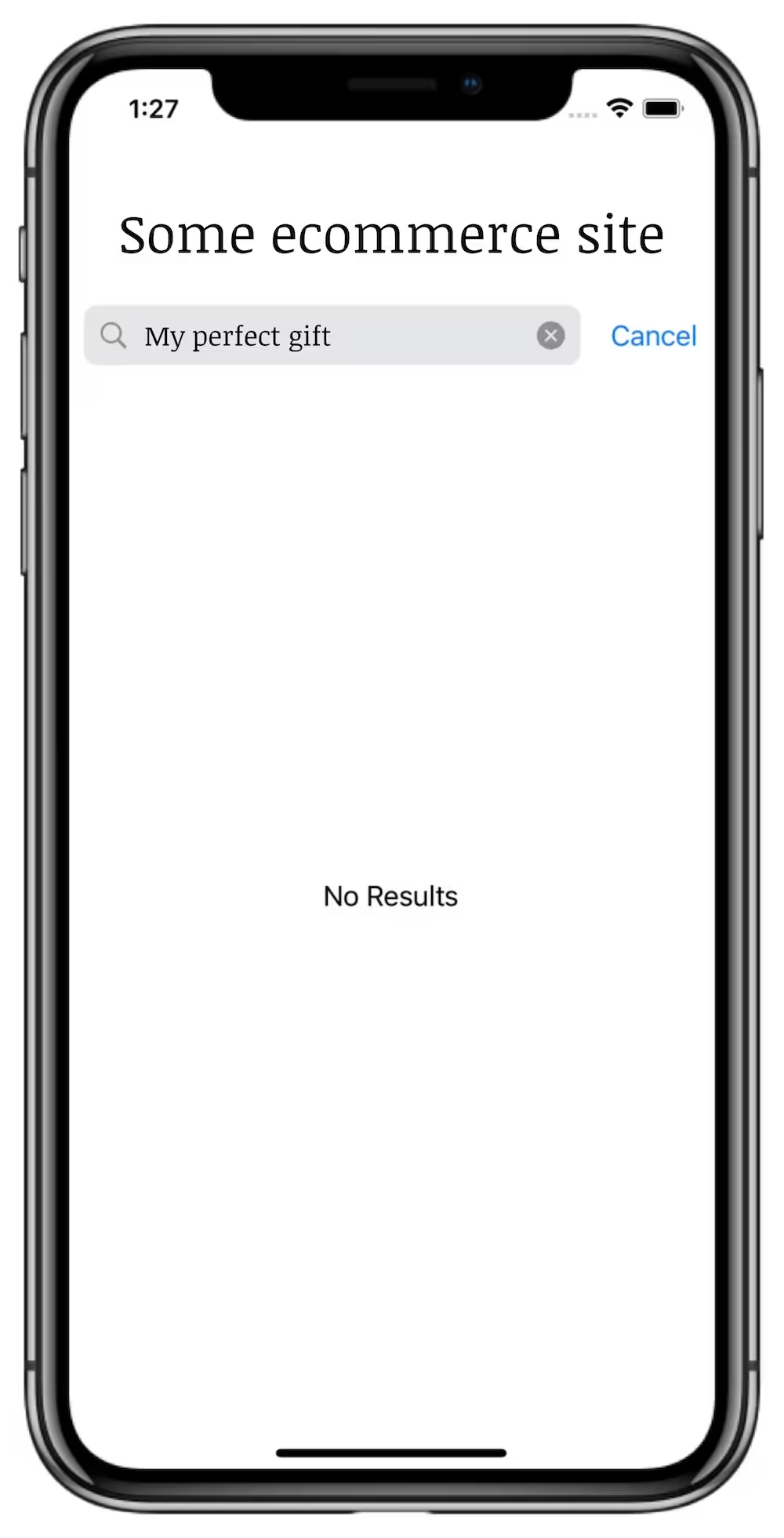
Picture this: you’re shopping online or in an ecommerce app, searching for just the right gift for someone you love. You’ve got a great idea, but as soon as you search for it, you get this:
No! The dreaded “no-results” page. It completely ruins the shopper’s journey and makes it very likely for that shopper to leave your site or app.
If you’re running the search in an ecommerce store, you should take these scenarios seriously because they directly translate to lost revenue. They signal a mismatch between the shopper’s intent and the retrieval stack you’re running, so it’s important to understand how exactly they occur and what to do about it.
When should we be concerned with no-results pages?
The appearance of the no-results page means shopper intent ≠ retrieval engine’s understanding. This could be interpreted in one of two ways:
The shopper’s intent is wrong for our store
This is rare, but it happens in certain circumstances, and here is where the no-results page can be a good thing. In these situations, we want the user to know they’re not in the right place. For example, the user might have searched for something inappropriate. Or, perhaps the user searched for something that the the store doesn't sell – like searching for apple juice on apple.com. Or, perhaps they searched for something typically sold but that is temporarily out-of-stock, so it's best to show them a no-results page that says in big lettering: “We don’t have this item right now, but we think you’ll like these alternatives” and shows a few recommendations. In these contexts, a no-results page is the genuinely appropriate outcome.
The shopper’s intent wasn’t understood properly
This is the far more likely scenario, and it just means that the query wasn’t interpreted correctly by our retrieval engine. These types of no-results pages are often symptoms of deeper issues in how our tech stack works. This is a very fixable problem — low-hanging fruit as they say — so we’ll focus on this scenario for the majority of this article.
The classical techniques
Before jumping into the deep end, there are some baseline improvements that move the needle:
Spell correction & fuzzy matching — These features catch typos and help the retrieval engine compensate for user error.
Synonyms — Your shoppers might use a wide variety of terminology; this feature lets you manually and dynamically inform the engine about them.
Helpful messaging — The simplest thing you could do is just suggest that the user search for a more generic query.
These suggestions aren’t solutions per-se. They reduce the occurrences of no-results pages, but they don’t solve the underlying semantic mismatch or the ambiguity about the shopper’s intent. They only help smooth things over when the system is already failing.
A base of semantic, intent-aware search
The real solution is semantic search, an AI-driven retrieval algorithm that matches queries to results by what they mean and not just by what words they contain. Traditional search hits a dead-end when the queries are unpredictable since matches depend on shared keywords between query and result. Semantic search, on the other hand, understands the intent behind those queries well enough to pull up related results regardless. Traditional keyword search still has its benefits though — it’s very good when the user knows exactly what to search for — so your best possible tool is a hybrid keyword and semantic retrieval engine like Algolia’s NeuralSearch, which blends together the best results from both approaches in lightning speed. This might not eliminate no-results pages entirely (since there are still a few reasons they show up we haven’t discussed yet), but it will significantly lower accidental failures by interpreting text based on meaning, similar to how us humans do.
A pinch of reasoning, a dash of context
The hybrid keyword and semantic retrieval engine should pull up some fantastic results if the query was meaningful, but that might not always be the case: the user might have still worded the query incomprehensibly or applied some refinement accidentally that excludes the result they’re looking for.
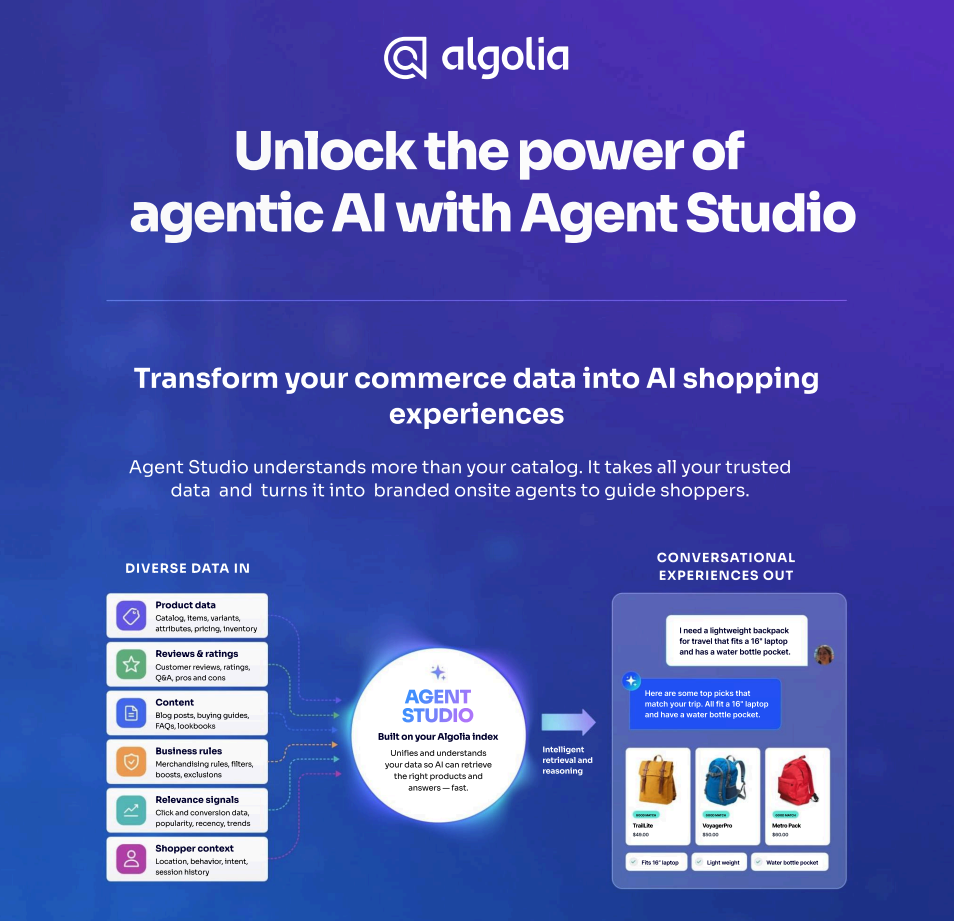
The next step in the evolution is agentic search, something we’re fond of here at Algolia. The idea is that an agent (aka, an automated, LLM-driven system which can converse and take meaningful actions instead of just returning text) runs the retrieval engine instead of surfacing it in a search box. The agent can converse with the customer briefly or at length, come up with one or even multiple queries which could potentially match the shopper’s intent, then select the best results and display them right in the context of their conversation. This could come in the form of a chatbot, but it doesn’t have to — agents are currently being deployed with Algolia’s Agent Studio in a number of other use cases.
Agentic search is the right approach because it does more than just understand a query. It deconstructs complex queries, breaking larger tasks into simpler actions, and assigning tools to complete those actions. It isn’t limited to a simple query string — the agent can ask the shopper clarifying questions, apply filters by itself, reason on use cases, and fallback to pre-programmed responses easily if needed. Previously, having results or not having results was a binary option, but now that line is blurred since the agent can choose to continue investigating, recommend similar products, or try to help the user a different way.
By now you may be wondering what’s the difference between semantic and agentic search? We have an ebook that goes into more depth. Get your free copy on the page aptly titled, “Semantic Search vs. Agentic Search: what’s the difference?”
Ok, back to our main topic at hand.
Agents can also map concepts from natural language queries to real keys in our structured product set. For example, a user might tell the agent something like im going to paris in febuary, what should I wear. The agent can understand the intent of that message regardless of the spelling and grammatical errors and convert it to queries and filters it’ll pass to the retrieval engine. It can resolve some ambiguities without even asking more questions, like filtering out potential results based on warmth or style since the shopper mentioned Paris in February. In other words, agentic systems anticipate user needs and fill in the gaps before the user ever sees a no-results page; and if there really are no results, the agent can transition smoothly into recommendations or something similar.
How to measure success
So how do we know if our changes are working? Many metrics tossed around in conversations like this don’t really mean much under the surface. For example, a high number of total searches could be a fantastic thing (”Tons of shoppers are finding things on our site!”) or a terrible thing (”The same few users had to search dozens of times each before they gave up looking…”). That’s a vanity metric, one that doesn’t really tell us much about how our retrieval engine is doing.
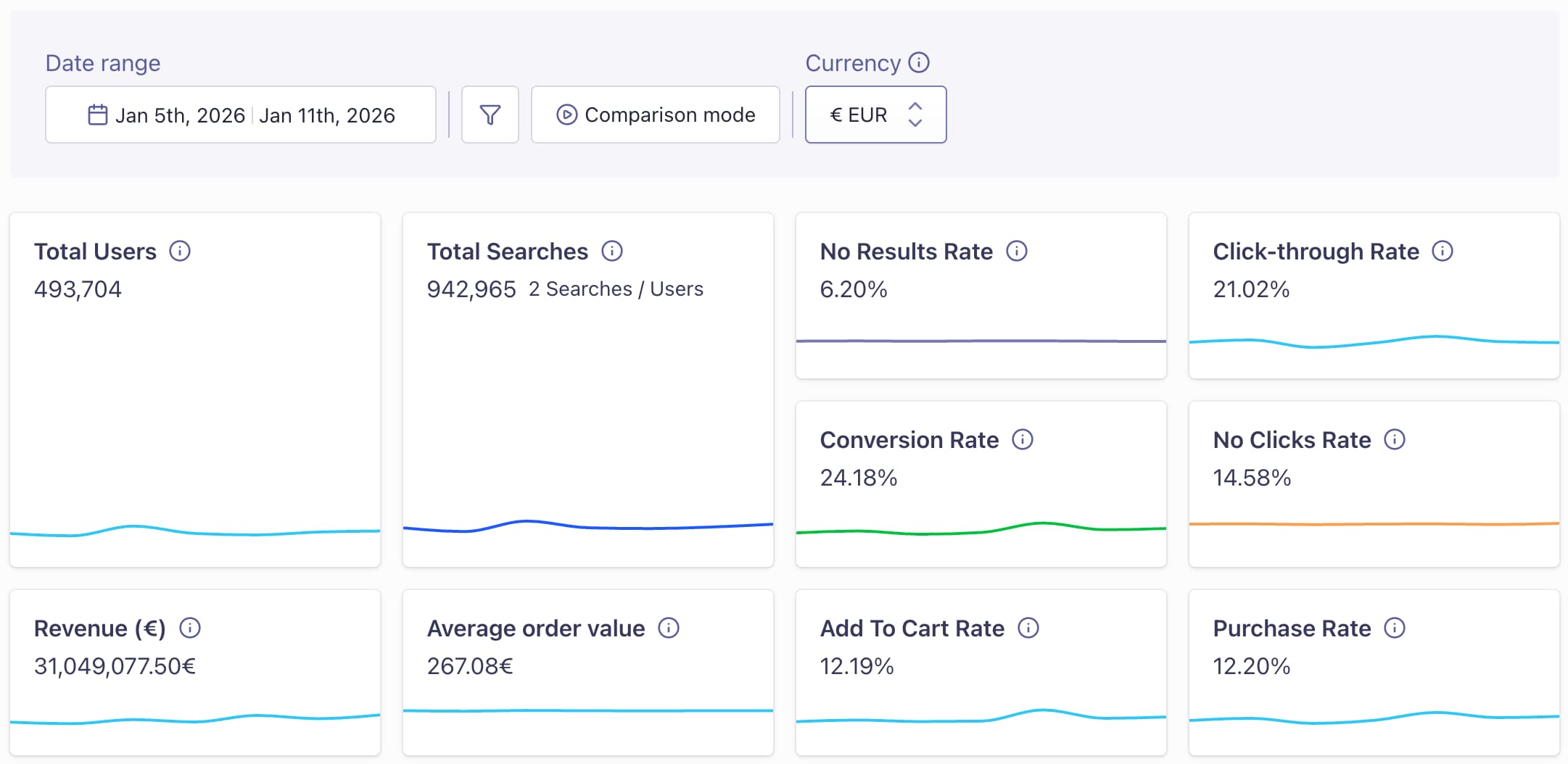
No Results Rate: This is the obvious one. Expect it to go down, but never hit exactly zero since there are some circumstances where it’s appropriate.
Searches Per User: This is right inside the Total Searches box. The target value depends on your product catalog, but NeuralSearch alone should lower it and NeuralSearch + agentic retrieval should send it higher. If you’re seeing the inverse, either NeuralSearch queries need to be expanded more using the baseline tips above, or your agent is just querying too aggressively and the prompt needs to be adjusted to tell it not to.
Click-through Rate and No Clicks Rate: These measure how much interaction (or lack of it) your results get, which is a good way to tell whether your users think the retrieval engine is doing a good job. If you’re curious why these don’t add to 100%, they might not be measuring exactly what you think — you can learn more about it here.
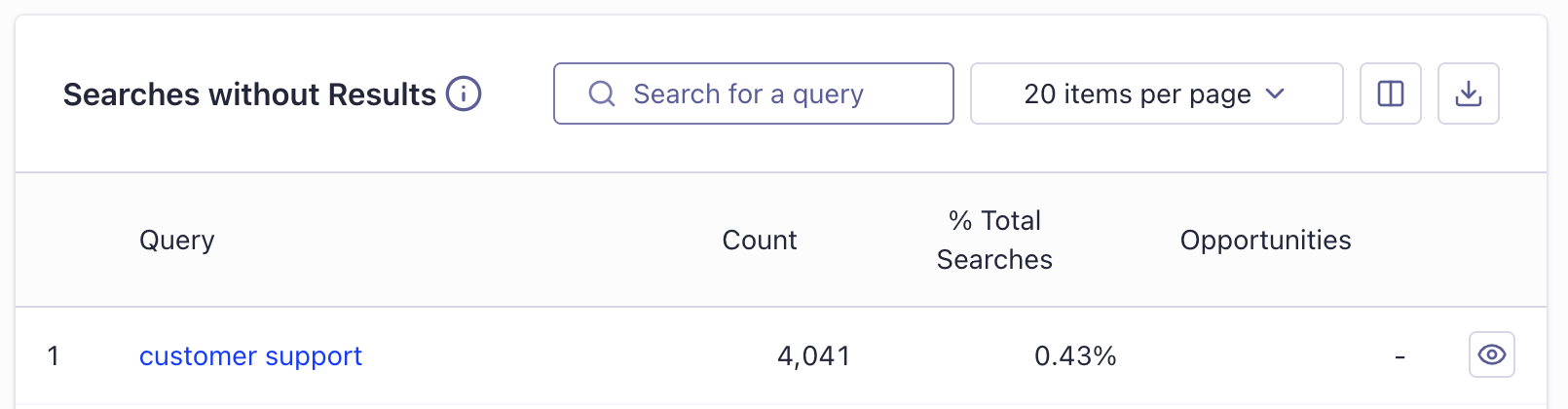
These overall metrics are a great place to start, but you can find even more granular data in the secondary tabs like Searches Without Results.
As you can see in this example, our most searched query that doesn’t return any results is “customer support”. There’s an argument to be made that this shouldn’t return any results, since the user isn’t actually looking for a product from our catalog. Here’s a better way of looking at it: the shoppers are telling us what feature we need to add to improve their experience. Some of them are clearly struggling to figure out how to get in touch with our customer support and are falling back to putting it in the search bar.
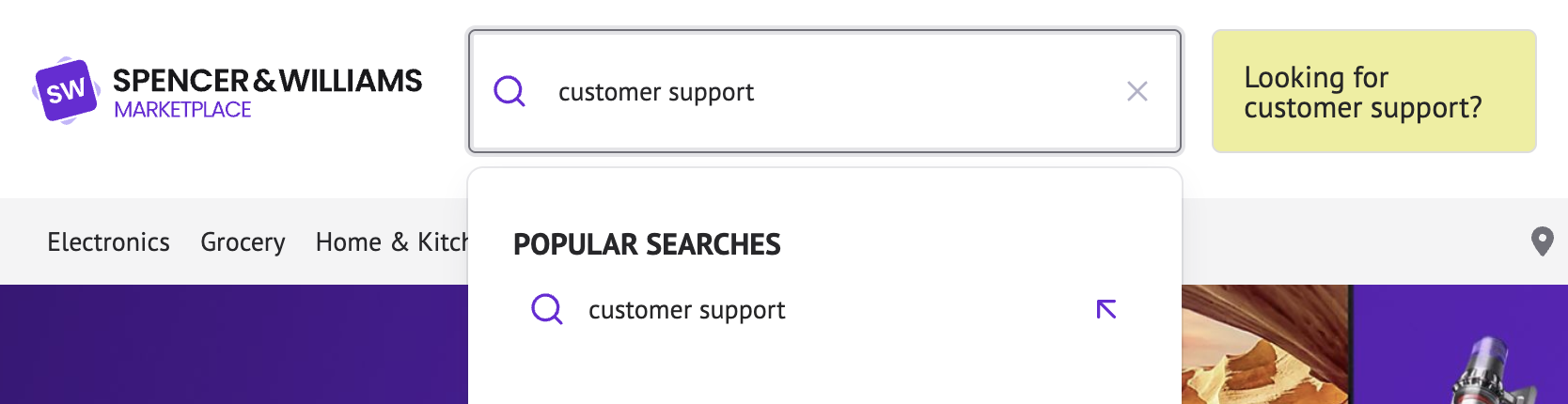
If we’re using NeuralSearch, we might need to add a queryHook to our searchBox which always runs the search, but adds a little popup next to the search box if the customer is clearly searching for something that isn’t a product.
The user will notice that something just changed on their screen, so it doesn’t even have to be a popup; a simple button that says “Looking for customer support?” will do. This is a 5-minute PR that would save the users of our example site lots of frustration. Using the analytics dashboard in Algolia in this way is the key to making informed, efficient improvements to your retrieval setup, regardless of whether you’re running full agentic retrieval or not.
A checklist recap
Here’s a checklist to help you evaluate your current retrieval setup and identify how to improve.
The low-hanging fruit
Enable Spell Correction: Do you catch typos automatically?
Set Up Synonyms: Does your engine know that "sneakers" and "tennis shoes" are the same thing?
Implement Query Expansion: Does your system automatically relax specific terms to find broader matches when a strict search fails?
Audit "No-Results" Messaging: If a search fails, do you provide helpful tips (e.g., "Try a more generic term") rather than a blank screen?
Upgrading the core engine
Deploy Hybrid Search: Are you blending traditional keyword matching with Semantic Search to understand the meaning behind a query?
Solve for Out-of-Stock: When a product is truly missing, does your page automatically surface similar recommendations to keep the journey alive?
Agentic retrieval
Consider Agentic Retrieval: Could an AI agent help "reason" through a complex query to find the right retrieval parameters?
Catch Specific Weird Queries: Have you identified what queries are causing the most no-results pages and handled them if possible?
Using analytics well
Monitor "No Results Rate": Aim for a steady decrease, but keep a baseline for "appropriate" failures.
Track Clicks: Watch for signs that users are struggling to find what they need.
Review "Searches Without Results": Regularly check your analytics dashboard to see exactly what customers are asking for that you aren't providing.
If you take away one thing from this article: a no-results page isn't just a technical glitch; it’s a "closed" sign on your digital storefront. Every failed search is a moment where a customer felt misunderstood.
Semantic and agentic approaches help our system actually understand the user instead of just trying to match their word choice, and if there truly is no direct result for their query, agentic retrieval and great UX design extend the user journey anyways. That’s how we stop no-results pages from being the dead-end they’re usually thought of as and instead see them as data-driven opportunities to make the shopper feel more heard.




.webp)





.jpg)










%20(2).svg)