Every day it seems there’s a new announcement about something else agents can do. But the autonomy to search, reason, and act creates risk too. Without supervision, sometimes they answer inappropriate questions, drift outside their intended purpose, consume more tokens or tool calls than expected, or reveal confidential info.
Here’s the good news: these risks are very manageable! The latest updates to Agent Studio include content guardrails, cost and usage limits, and access controls. These changes give teams more control over how their agents behave and where they can be used. In this blog, I'll cover how they work and offer some practical steps for keeping customer-facing agents focused, resilient, and economically sustainable.
Content guardrails
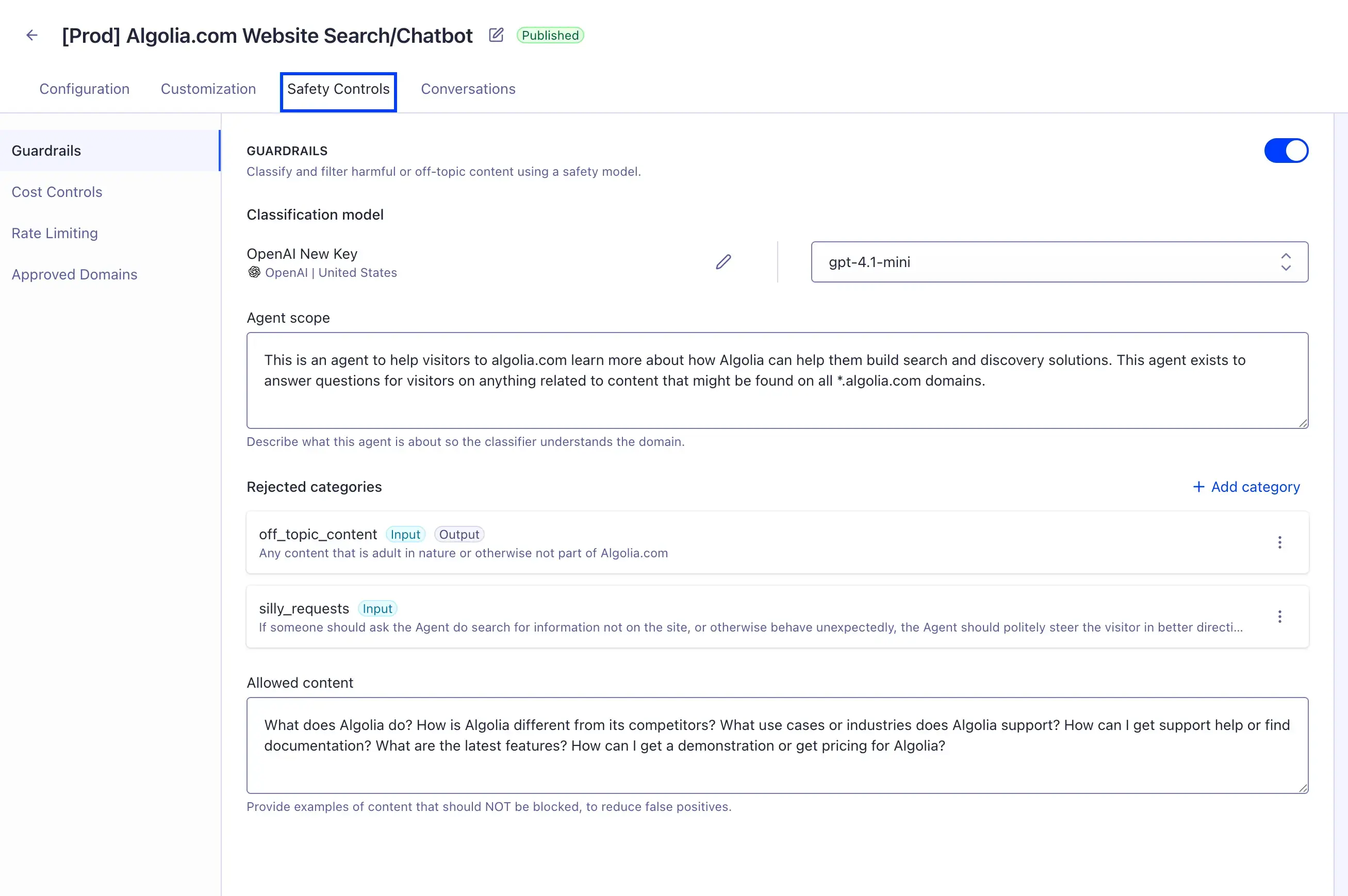
Guardrails in Agent Studio aren’t just a fixed list of universal moderation rules. Instead, they’re fully configurable, so you can adapt them to the purpose, abilities, and risk profile of your particular agents. The configuration has several main parts:
Categories of prohibited content. This is where you identify broadly what type of content you want the guardrail classifier to detect. Each category should represent one recognizable boundary that the agent should never cross such as inappropriate content, competitor mentions, prompt-injection attempts, or something else of a similar specificity. Make sure to be very precise in your description — vague descriptions lead to inconsistent classifications because the classifier model uses the description to decide whether a message violates the category.
Where the guardrails are applied. The classifier can be used to check messages submitted by users to the agent (inputs) or responses generated by the agent (outputs) or both. Input-scoped categories govern what the users can ask the agent, so this is the ideal spot for flagging unrelated questions or prompt-injection attacks. Output-scoped categories govern what the agent says back, so this is the ideal spot for censoring private information or competitor mentions. While you can run a guardrail in both directions, it’s worth taking a moment to judge whether that’s really necessary, since running it only one way will likely improve speed and maintainability.
The agent’s intended scope. Agent Studio lets teams give the guardrail classifier a concise description of the agent’s specific purpose. This is separate from the prohibited categories blacklist — this is more of a whitelist of allowed domains. Keep the scope specific but concise. It should identify the agent’s role and domain without becoming a second system prompt or an exhaustive statement of business policy.
Which provider and model to use. Guardrail classification uses a separate LLM call with its own provider and model—not necessarily the same one the agent uses to generate responses. This lets teams choose a model that balances classification quality, latency, and cost.
Fallback responses. Every category can have its own preset response that it falls back to when a violation is detected. Choose fallbacks that are clear, helpful, and specific — avoid exposing internal policy details or coming off as punitive. Explain to the user exactly what went wrong and what assistance is still available. A clear explanation can reduce support questions, while a useful path forward makes the blocked interaction less frustrating.
In addition to these configuration options, you can always test blocked and allowed cases in our playground. Teams can submit examples that should trigger a guardrail alongside examples that should pass through normally, confirming that the classifier is behaving as expected. Put together an internal list of clear violations that should be blocked, clearly acceptable requests that should pass, borderline cases near the policy boundary, and rephrasings of all of these. The goal isn’t just to make sure prohibited content is blocked, but also that legitimate requests aren’t blocked unnecessarily and that fallback responses are appropriate for each blocked request. This testing can surface some issues that require tweaks with the original configuration, so expect to iterate a few times.
Together, these controls help keep agents focused on relevant questions and replace policy-violating inputs or outputs when classification succeeds. The playground and guardrail events also make those decisions visible, so teams can confirm that the rules behave as intended.
How classification works
This classification is an extra check before a generated response is shown to a user. But that process looks different depending on whether the model streams it token by token or just returns it whole.
For non-streaming models, Agent Studio compares the whole input message with every guardrail category that applies to user inputs. If any rules are violated, Agent Studio blocks that message and returns the fallback for that category instead. Otherwise, the input is sent to the agent and its response is generated like normal. Afterwards, it runs the output category checks on the model’s response and the previous messages in the conversation, and it replaces any unsafe responses with the appropriate fallbacks.
Streaming responses are slightly harder. Instead of waiting for the input check to finish before generation begins, Agent Studio checks the user’s message while the agent starts generating its response. If it finds an input violation, the client clears any partial response that has already appeared and replaces it with the correct fallback. Then, after generation is finished, Agent Studio checks the full response and the previous messages together against the guardrails that apply to outputs. If that check finds a violation, the client removes the generated response and shows the appropriate fallback instead. Checking the conversation as a whole helps protect against complex attacks that string together multiple seemingly inert messages to create one malicious command.
What happens if classification is unavailable
Guardrails depend on a separate language model to classify each message. If that model is unavailable because of a timeout, API error, or rate limit, Agent Studio allows the content through instead of blocking the request. This is called “failing open”. It prevents a problem with the classification provider from taking the entire agent offline, but it also comes with the obvious tradeoff that guardrails aren’t an absolute compliance boundary. They’re one layer in a broader safety setup. Teams handling confidential or otherwise sensitive content should combine guardrails with access controls, careful data permissions, and thorough testing of failure cases and policy boundaries.
The client is responsible for the UI
When Agent Studio blocks a streaming response, it tells the client:
which guardrail was violated
what fallback to display
The client must then replace any blocked content already shown with that fallback.
InstantSearch Chat handles this automatically. Agent Studio still performs the classification, identifies the violation, and supplies the fallback; the client library switches the response shown in the UI. Developers just listen for the violation event, clear the partially-displayed response, and show the fallback supplied by Agent Studio.
In short: Agent Studio decides what to block; the client ensures it is removed from the UI.
Cost and usage controls
An agent can become expensive because of high traffic, long answers, excessive tool calls, or lengthening conversation histories. Agent Studio gives teams separate controls for each of those problems.
Control how often the agent can be called
Rate limits cap the number of requests an agent will accept during a set period. You can apply one limit to the agent as a whole (which helps contain overall traffic) and another to each IP address (which prevents one source from racking up your usage). When either limit is exceeded, Agent Studio rejects the request with an HTTP 429 "Too Many Requests" error and tells the client when it can try again. The two limits are independent, so teams can use either, both, or neither.
Put a ceiling on each request
A single request can also become expensive if the answer runs long or the agent keeps reasoning and calling tools. Several settings can help with this:
max_tokens: Limits how many output tokens a model call can generate. Leaving it at 0 or leaving it out entirely uses the default set by the chosen model or provider.
max_iterations: Limits how many tool or reasoning loops the agent can run during one request. Each iteration is another language-model call, so a long chain can add up quickly. The default is 50 when the setting is omitted or set to 0. Agents with simple jobs will often need far fewer.
thread_depth.max_messages: Limits how many user and assistant messages can be included in one conversation. Past that limit, the API rejects new requests to extend the conversation rather than quietly dropping older messages. That behavior avoids hidden context changes, but the client should be ready to explain the limit or offer a way to start a new conversation. Setting this to null or 0 (or not setting it at all) removes the limit.
Cached responses and context management
Agent Studio caches identical first messages by default. So when two users ask the same agent with the same configuration the same question, it generates the answer for the first and caches it, then returns it directly from the cache for the second user without another model call. That lowers token use and usually shortens response time for common, repeatable opening questions.
Follow-up messages still bypass the cache, so this isn’t a silver bullet. Conversation context can keep growing, especially when each request adds more instructions or retrieved information. Try to keep the information sent to the model focused on what it needs for the current task — that will improve cost efficiency, speed, and answer quality.
Measure what the controls are doing
The Agent Studio analytics dashboard shows total conversations, input and output tokens, and Algolia Search tool calls. Those figures can reveal expensive usage patterns, but they do not show the full bill by themselves. Teams should compare them with their model provider’s billing data to understand actual spend. Guardrails can sometimes reduce that spend, but not in every case. A blocked non-streaming input can stop the primary model call before it happens. With streaming, however, input classification runs while the agent begins generating, so a blocked request can still consume model tokens.
Access controls
Even a well-behaved agent can become a problem if anyone can call it from anywhere. Agent Studio lets teams create an approved-domain list that limits which browser origins can send requests to the agent’s completion endpoint. Tying the agent to its app reduces unauthorized use and unexpected token spend.
Approved domains are not a replacement for signing users in or checking what each user is allowed to access. They control where browser requests can come from; authentication and authorization control who the user is and what that person can do. Production integrations usually use both.
A practical rollout checklist
A controlled rollout is easier with steps to check off:
Start with a small, focused guardrail policy built around the most important prohibited categories.
Set conservative limits for output tokens, tool or reasoning iterations, conversation depth, and request volume.
Add approved domains for production integrations, alongside authentication and authorization.
Test realistic and adversarial conversations in both streaming and non-streaming modes, including classifier failures and custom-client handling.
Monitor usage and provider billing, then refine the guardrails, prompts, context, and limits based on what you observe.
Make autonomy production-ready
The goal is not to remove an agent’s flexibility. It is to put clear boundaries around how that flexibility is used. Agent Studio brings those boundaries together through content guardrails, usage limits, caching, analytics, and approved-domain restrictions.
No single control covers every failure mode. Used together—and tested against both normal and failure cases—they give teams a practical way to keep agents useful without leaving behavior, cost, or access open-ended.


.webp)














%20(2).svg)