1. Executive summary
In today’s data-driven world, information has become the new fuel. Companies— whether in retail, finance etc.—sitting on vast reserves of untapped data can both accelerate their tech transformation and deliver customers unparalleled solutions.
From product catalogs to customer support knowledge, internal wikis, and multilingual documentation, the volume and diversity of information can overwhelm both employees and customers. Traditional keyword-based search systems, while straightforward and easy-to-use, often leave users frustrated as they dig through pages of irrelevant or partial information, suffering from vocabulary mismatch, boolean logic errors, and outdated document references.
Retrieval-Augmented Generation (RAG) offers a transformative approach: by combining semantic retrieval mechanisms with powerful large language models (LLMs), organizations can provide conversational, context-aware responses directly over their pool of data. Instead of presenting raw links or document snippets that readers need to scurry over, RAG retrieves relevant information and combines business rules and domain context to ground a model’s output into accurate responses with respect to the business domain.
In this white paper, we will explore:
- The definition of RAG and its role in modern enterprise AI architectures. We will dissect the retrieval and generation components, both architectural and technical, understand what are embedding models, vector stores, and discuss LLM prompt design that is ideal for organizational search.
- A comparative analysis between traditional search paradigms (Boolean and keyword matching) and RAG-powered semantic search. This section will include performance metrics, cost considerations, and hybrid architectures, providing clear understanding of the changes an organization search system needs in this day and age.
- Security, privacy, and compliance requirements, with guidelines for encrypting vector stores, handling Personally Identifiable Information (PII), and maintaining audits of the system.
- Core RAG implementation considerations, including data ingestion, chunking strategies, embedding generation, vector database scaling, LLM orchestration, and observability pipelines.
- Data handling in RAG Pipelines, how to preprocess data before feeding into the architecture.
- Integration patterns with existing search solutions, demonstrating RAG architectures fit for different scenarios, using Algolia Search and basic concept-clearing.
- Business use cases in the retail sector, highlighting ROI drivers such as reduced handle times, improved customer satisfaction, and increased conversion rates.
- Consumer-facing experiences, including conversational shopping, chatbots, and image-based search augmented with RAG.
- Best practices and common pitfalls, covering prompt engineering, freshness of the system, maintenance, and monitoring strategies.
By the end of this paper, you will have an overall understanding on how to pilot, iterate, and scale RAG within your organisation, empowering employees to find answers faster and delighting customers with intelligent, conversational experiences in any channel.
2. From keyword search to conversational access
2.1 The evolution of enterprise search
Enterprise search has come a long way since its dawn in the late 1990s. Traditional keyword-based search systems relied on inverted index—mapping terms to document identifiers—and Boolean queries to filter results. Over time, features like faceting, autocomplete, and BM25 (Best-Matching) improved relevance, but users still face significant challenges like:
- Vocabulary mismatch: Users may not know the exact term used in documents. They could be typing a term they are familiar with — for example, searching "sneaker" when the enterprise catalog uses "athletic shoe" as an identifier tag.
- Complex queries: Multi-part questions often require multiple passes or a “Boolean Maze” where users had to manually choose available parameters like price, size, ratings, etc. after they have typed their initial preference into search, which in turn induces frustration in this scenario.
- Outdated indices: In most traditional search systems, when new content is added to a database or document collection, the search index needs to be completely rebuilt to include this new information. Many legacy systems use batch oriented workflows: you collect all the changes over a period (hours or even days), then run a job that tears down the old index and constructs a new one from scratch. Other traditional systems use incremental indexing (with periodic merge), which still leaves recent content undiscoverable, resulting in outdated results until the job is complete.
In the past five years with the advent of AI, two major breakthroughs have reshaped the technical landscape:
- Embeddings and vector retrievals: Embeddings map each piece of text (e.g., a sentence or product detail) to a vector—a position in a high-dimensional space. In that space, semantically similar texts cluster: “red dress” and “pink dress” land near each other, while “laptop specs” sits much farther away.
- Vector retrieval: imagine your query looks like “find red dresses under $100.” This sentence becomes a set of coordinates. Instead of scanning every document for these words and phrases, the system looks for the few stored points closest to your question’s coordinates. Those are the most relevant results.
Neural embedding models convert text into these dense vectors that capture semantic correlations. Using algorithms like approximate nearest Neighbor (ANN), systems can retrieve documents based on meaning rather than exact token matches.
Why capturing semantic meaning is necessary in modern search
It is important to understand exactly what customers are looking for. When someone queries “red dress,” they expect to see garments that combine both the shade and the specific style: a dress and nothing else. Offering blue shorts or a T-shirt in response to such a request not only irritates the user but also breaks their trust in the search system entirely. Modern search, empowered by Retrieval-Augmented Generation (RAG), discerns these subtle distinctions, delivering results that honor both color and category with unfaltering accuracy.
Large Language Models (LLMs):
An LLM is a model that returns fluent responses when given an input. The LLM uses that focused context to generate a precise, up-to-date response,
combining factual grounding with human language fluency. Some of the LLMs include pretrained transformer-based models like GPT, PaLM, and LLaMA that can understand context then perform reasoning with the given input. ChatGPT is a product that runs a version (or multiple versions) of GPT models to generate responses based on user query. The context for these models comes mostly from the global training conducted through freely available information on the web and also from human-annotated datasets for specific domains. It is also usually the factual grounding of the system when generating answers.
By marrying vector retrieval with LLMs’ generation capability, we arrive at RAG. RAG essentially combines a vector database of organizational data and vectorised user query and feeds it to the LLM’s generation power. The LLM model then uses this updated, focused context from both the database and query to generate answers that are both factually grounded and fluent. In essence, RAG “grounds” the LLM by first feeding the right information, then lets the LLM convert the output into a human-language response.
2.2 Why natural-language interaction changes the game
In a pre-RAG scenario, when a store associate needs to verify whether a promotional rule applies to clearance inventory or not, traditional search paradigm comes into play:
1. Search for "clearance sale rules" and read multiple PDF documents that match those keywords
2. Apply filters for "summer promo" and browse a results list
3. Manually cross-reference dates and product categories
This step-by-step process can result in excessive time consumption for very little result, forming inefficiencies in the pipeline along with added cognitive load. This would not only be inefficient for the store associate but also for the customer possibly waiting on the other line.
With RAG, the same pipeline becomes as easy as:
"Does the summer clearance sale include end-of-season swimwear?"
Under the hood, the system:
- Embeds the query and retrieves the top 5–10 (top-k) relevant passages from policy documents and product metadata
- Assembles a prompt that includes these passages and a template instructing the LLM to answer with specific reference to clearance categories
- Invokes the LLM, which generates a direct response like:
"Yes. According to section 4.2.1 of the Summer Promotion Policy, all items flagged as 'clearance—end of season'— including swimwear—are eligible for the 20% off price."
(Source: Summer_Promo_Policy.pdf; Product_Metadata_Store.csv)
Benefits:
- Reduced cognitive load: Users speak normally, without needing Boolean operators or domain jargon.
- Eliminated guesswork: LLMs paraphrase actual resource and infer intent, bridging vocabulary gaps.
- Faster time-to-answer: End-to-end queries complete in under a second.
2.3 Retailers’ urgency for richer experiences
With today’s demand for instant, accurate answers—whether via chatbots, voice assistants, kiosk screens, or mobile apps—retailers can’t afford gaps or inconsistencies. RAG-powered search helps bridge those channels seamlessly:
Omnichannel consistency
Every customer sees the same up-to-date answer, no matter where and what they ask. Whether someone scans a QR code in-store or taps a “help” button on their phone, the underlying RAG layer pulls from the same knowledge base and delivers uniform response, so you won’t get conflicting product specs or policy details.
Scalable support
Routine questions like, “What’s the return policy?” or “Is this item in stock?” or “Is this available in another color/size?” get handled automatically by smart assistants, 24/7. That allows the human specialists to focus on complex cases (VIP requests, technical issues, transactions/refund issues) rather than delivering repetitive information, letting you scale support without expanding manpower.
Personalized engagements
Because RAG can be integrated with available customer data (past orders, loyalty status, browsing history), follow-up prompts feel natural and relevant: “I see you bought a red dress last week—would you like matching heels to go that?” The system fine-tunes each response based on the shopper’s profile, turning one-size-fits-all FAQs into truly personalized conversations.
3. RAG fundamentals
3.1 What is retrieval-augmented generation (RAG)?
At its core, RAG combines finding semantically relevant content passages for a given query and using those retrieved passages to ground and guide an LLM’s output. It can be described as an overall, optimized architecture that enhances the user query, context (the documents or the texts users provide), and the LLM’s base knowledge to generate an output that is not only efficient but also grounded to factual information of the enterprise.
Among context-feeding and query-input, we need to explore how we can make such information machine-readable so that it understands what it reads.
3.2 RAG in the broader enterprise AI landscape
Traditional search systems started seeing their end when chatbots were steadily integrated into customer care, actively handling FAQs and retaining valuable customer metadata to enhance engagement. However, chatbots back then didn't have much intelligence integrated until the recent AI boom. To keep up in the wake of the AI Boom, organizations have tried to integrate AI not only through chatbots but through their search systems that cater to both users and employees.
As enterprises embrace the newly evolved AI beyond standalone chatbots or analytics dashboards, RAG incorporates several AI domains including the following.
Vector search and semantic retrieval
Modern embeddings don’t just capture word co-occurrence—they learn deeper representations of meaning between the words. Models such as OpenAI’s CLIP bring bridge modalities (different modes of data), mapping images, audio clips, and text into the same high-dimensional space (a.k.a. vectorization). In a RAG context, this means you can retrieve an image example for a product feature request, or pull in a video transcript snippet when users ask about “how-to” procedures—no separate pipelines required. These advances let retrieval steps power truly multimodal experiences. An example of such an experience could be a user uploading an image of a piece of gold jewelry and trying to find something similar in silver. The same model that generates information based on textual queries and database information can also vectorize an entire image’s data into the same embedding space, combined with the vectorized queries to generate solutions that the user prefers. Albeit the suggestions may not be 1:1 of the image (if they don’t have jewelry as the image) but the model will, at its best, suggest whatever the business has closest to the user’s request.
Knowledge-centered generation
Beyond answering ad-hoc questions, RAG fuels robust documentation workflows. Retrieval-Augmented Summarization tools can ingest large policy documents, then generate compliance reports on demand—citing exact passages and automatically flagging potential gaps. Fact-checking pipelines similarly leverage RAG to cross-reference claims against authoritative sources, producing traceable “evidence tables” that auditors or legal teams can review. Enterprises use these frameworks to keep handbooks, SOPs, and technical guides in sync with evolving regulations or product updates, automating tasks that once required dedicated documentation teams.
Conversational AI and agents
State-of-the-art agentic assistants don’t just chat—they reason through multi-step processes, orchestrating API calls, condition checks, and retrieval queries in a single session. A retail agent, for example, might first pull inventory data via an ERP API, then run a RAG lookup on “best alternative products” if stock is low, and finally consult a pricing engine to propose a discount. This dynamic decision making—knowing when to search versus when to invoke an external service— turns traditional chatbots into flexible advisors capable of end-to-end transactions, risk assessments, and personalized upsell recommendations. By embedding RAG at the core of these domains, organizations can build:
- Automated domain experts
Deploy virtual consultants that never sleep: they surface the latest corporate policies, product roadmaps, or legal disclaimers on demand. Approval workflows—say, for marketing collateral—can even be enforced by gating certain retrievals until a manager’s sign-off is embedded in the prompt context.
- Proactive chatbots
Trigger knowledge pulls at critical moments: if a customer browses over a high-value product for too long, the system can automatically retrieve “super saver offers” or loyalty perks activated through sign-ups. Similarly, risk mitigation RAG calls can detect unusual transaction patterns (often a huge sum total or a large quantity of a product) and surface fraud-prevention protocols to service agents in real time.
- Data-driven workflows
Link RAG outputs directly into business systems: extracted insights or summarized action items can spawn tickets in service desks, update records in your CRM, or even kick off approval processes in your ERP. This transforms RAG from a passive answer generator into an active participant in enterprise operations—closing the loop between knowledge retrieval and automated execution.
Now that we have gathered an understanding of how singular or multiple RAG systems can help integrate AI into the Enterprise search spaces, you will now move forward in understanding, at a deeper level, how RAG makes all the functionalities come together as a single compute unit.
3.3 Core RAG Components
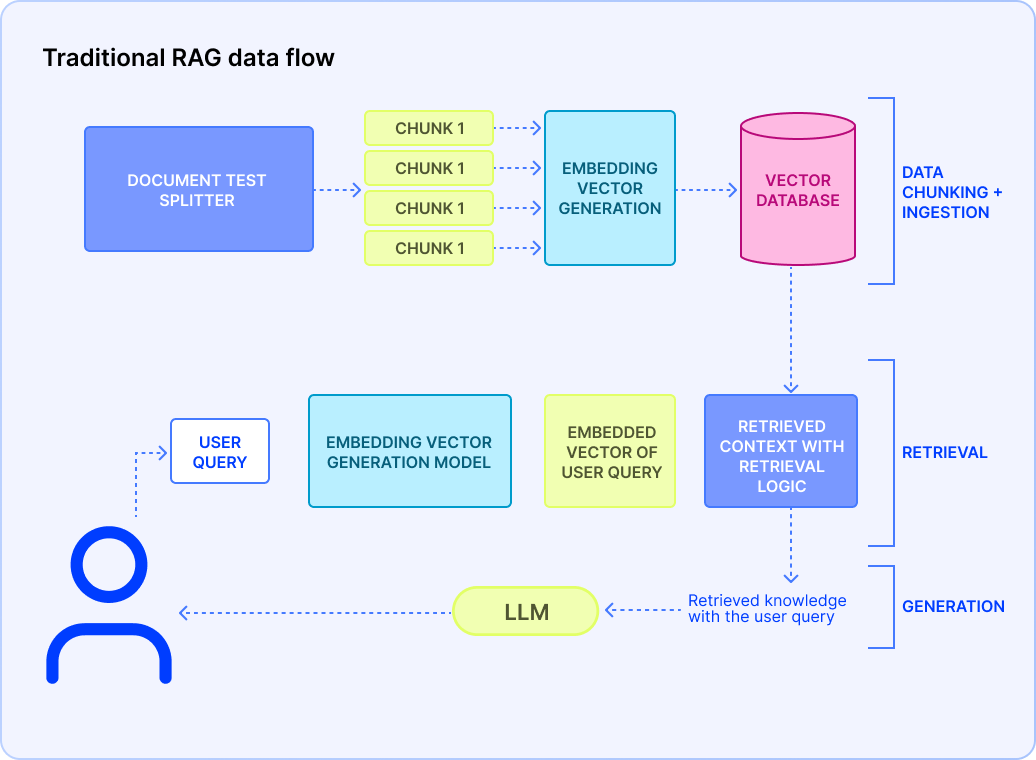
An enterprise-grade RAG pipeline is a multi-stage workflow that ensures fresh, relevant, and compliant answers at scale. In order for this workflow to run smoothly, the building blocks of the workflow must be understood in depth. The core technical concepts of RAG are the main drivers of the architecture. These individual points will provide you with a macroscopic view of how it might look for a business’ data and how the flow starts:
Data ingestion and chunking
Data ingestion is the process of gathering all your raw content from various sources and bringing it into a central staging area where it will be prepared for RAG. You can imagine it like moving books from different shelves consisting of different genres into one singular pool. Your organizational data could be streaming from multiple platforms:
- Content Management System (CMS): Contentful, Drupal, WordPress—rich text with embedded media
- Customer Relationship Management (CRM): Salesforce cases, Zendesk tickets—customer dialogues and issue histories
- File storage: S3 buckets, SharePoint libraries—PDFs, slide decks, spreadsheets
- Databases: MySQL/Postgres tables, ERP/CRM schemas
Data from various platforms, collected in a common ground, will now go through the ETL process which stands for:
- Extract raw text (and metadata such as author, timestamp)
- Transform by normalizing fonts, stripping HTML/CSS, converting tables into plain-text lists
- Load into a staging database or object store, tagged with content-type and ingestion date
Now that you have prepared your raw data and funnelled through the ETL process, it is time to “chunk” the data.
Chunking takes those large, monolithic documents and breaks them into bite sized, semantically coherent passages—typically 200–500 words each which is around 267-667 tokens. You do this to consider:
- LLM context limits: Most models can only “read” a few thousand words at once
- Precision: Smaller chunks mean the retrieval step can pinpoint exactly the most relevant passage
Good chunking practices include:
- Semantic splits: Prefer breaking at paragraph ends, section headings, or PDF page breaks. This ensures the logic of the sentence isn’t lost midway and LLM actually captures it
- Overlap: Include a 10–20% overlap (e.g., 50–100 words or 67-133 tokens) between adjacent chunks so you don’t lose context when a concept spans for two sections
Why it is important:
For example, a 2,000-word product manual might become five 400-word chunks, each overlapping the next by around 80 words. When a user’s question maps to chunk #3, you still have enough lead-in and follow-up text to keep the answer coherent.
Why monitor context window size and overlap?

267–667 token blocks split helps balance context vs. token-cost. This balance is needed for a couple of reasons: 267–667 tokens (200-500 words) are enough to portray the overall context of a paragraph, any lesser may be too small for the LLM to catch the essence of meaning.

Another reason is the cost of the LLM per token that is charged by the APIs that might be used. Within the aforementioned token range, you can retrieve and feed more chunks into the model without exceeding its limits or spending excessively.

An overlap of approximately 50–100 tokens (67-133 tokens) helps retention so the model doesn’t lose “flow” between chunks. This ensures the ongoing context between sentences or paragraphs to retain.
Once you’re done with the chunking of our raw data, you move to the most crucial part of this data processing step: embedding generation.
Embedding generation
Embedding generation is the process of representing the preprocessed data in a fixed dimensional matrix which can be 512 to 1536+ dimensions. Simply put, each of the words in the preprocessed text will be represented by a vector of the specific dimension. A word like “queen” may have a vector that is very close to a vector of the word “woman” and further away from a word like “football.”
Model choice
You can choose off-the-shelf transformer-based embedding models (e.g., text embedding-ada-002 ) or you can also use embeddings specialized for specific LLMs. For multi-modal data processing, there are dedicated embedding models that help unify the data in a single embedding space which helps with multi-modal search systems.
Updating embedding generation
In order to keep our semantic indexes up to date with our latest document update, we can always update the embeddings in either batch or streaming or a hybrid of both, depending on the organizational needs. For example, if there is an update on a return policy change in the documents, the previous documents consisting of older policies will be replaced with the new. Hence, our already embedded vector database needs to account for the update as well. The two methods are discussed in details below:
Batch: The embedding update can be scheduled at a fixed time such as once a week or once in three days. This would be ideal for an enterprise that typically does not update documents too frequently. Any update between these scheduled times will be lost and a query from the user within the domains of the update may not be accounted for until the update has taken place.
Streaming: Real-time pipelines (Kafka, Pub/Sub, Kinesis) push new or updated documents immediately. It is a safer approach, in case the update happens frequently or not. Even enterprises that scale fast will not need to worry about changing their search architecture if streaming is already in place. The downsides for this method is the complexity of setting it up, requirements for handling per-item failures, and scaling for unpredictable spikes.
Vector store and index
A vector store is a specialized database storage for a large number of embeddings. What makes this unique is its ability to search through the embeddings at a fast speed, which reduces search look-up time. It achieves this through a data structure called an index. The vector store builds index over the embeddings which makes finding specific vectors easy at lightning speed.
When designing your vector store, choosing the right indexing strategy and data partitioning scheme is crucial for performance, scalability, and compliance.
Architecture index types
- Hierarchical Navigable Small World (HNSW) for dynamic inserts and low-latency lookups follows a multi-layered graph data structure that stores one vector as a node, which is connected to a handful of neighbors of other vectors on the top layer
- Inverted File with Product Quantization (IVF+PQ) for extreme scale—this clusters embeddings into n coarse groups via k-means, creating “inverted lists” of vectors per centroid. PQ then splits each vector into sub-vectors and replaces each with the index of its nearest codebook centroid—storing the result as compact integer codes
- Sharding: Indexing through a logical boundary, partition by geography or content category to respect data-residency rules. This makes enterprise data fetching easier if there are multiple hosts in different locations
Retrieval logic
Up until now, we focused on how to preprocess contextual data that comes from enterprise documents. Now we need to focus on what comes directly from the users but here’s the catch — it needs to be fast.
Retrieval logic is the set of steps that turns user queries into the right pieces of context before sending them to the LLM. For the query embeddings to “land” correctly in your vector index, you would want to use the same embedding model (and version) that you used to pre-compute your document embeddings along with any preprocessing steps done before embedding and post-embedding.
To keep interactions with your user feeling instantaneous, this embedding step must be completed in under 50 ms. Fresh queries often reflect the user’s evolving intent— perhaps they’ve just clicked a product link or changed their context. Generating embeddings on the fly ensures you react to these nuances immediately.
Business Filters will help narrow the search scope by filtering out ineligible documents—e.g., enforcing a tenant ID, language tag, or product category that may have been mentioned in the query. It will get instantly noted. Only the remaining passages are considered.
The query vector combined with the vector store (after applying the business filters) will be fed into the ANN model and this will return the K-context snippets under the cosine or Euclidean distance. The “K” will be something you would be able to choose—it would be a real positive number.
Prompt assembly and LLM invocation
Once we have secured our top K-context snippet with respect to our users’ query, we now package them into a comprehensible prompt that will be sent into our LLM unit. Depending on the prompt formation, the LLM will be able to generate a focused and accurate response. So naturally, you need to give attention to the prompt assembly technique:
System message
Start with a clear, high-level instruction that sets both the model’s role and tonal expectations. For example:
[System]: You are a friendly product guide who answers customer questions concisely.
This “system” line anchors the model’s behavior before any user-specific content appears.
Labeled context blocks
The K-context snippets retrieved from the previous retrieval logic can be bundled into the prompt that’s labeled as
[Context 1]…[Context K]

[Context 1]: …first snippet…

[Context 2]: …second snippet…

.

.

[Context K]: …Kth snippet…

…
By explicitly numbering context passages, you cue the LLM to ground each claim in a specific block—improving factuality and enabling downstream referencing.
Finally, surface the original query:
User question: “How do I return an online purchase?”
This clear separation of “system instruction → context → question” helps the model distinguish between what it should do (system), where to look (context), and what to answer (user query).
Keep token limitations in mind, as they can vary from one model to another, and CoT (Chain-of-Thought) reasoning can invoke more tokens than initially observed. To guarantee the model can generate a complete response, reserve headroom: 4000 for context and snippets, then 1000 for the answer itself.
Post-processing and response delivery
Once your LLM has returned its generated text, apply a final polishing layer and integrate the result into your user experience:
- Structure validation
Confirm the model adhered to the expected output format (e.g., bulleted lists, JSON schema). Any abnormalities or deviations from the output format should be rejected and re-invoked
- Security scrubbing
Keep an eye out for any data leaks such as internal tokens, placeholder keys and Personally Identifiable Information (PII) before releasing the system to the end-users
- Citation extraction
Track which [Context i] block informed each statement. Embedded links that surface the original document title, page, or paragraph number makes your system’s reasoning fully credible and trustworthy
4. RAG vs. traditional search
|
Aspect
|
Traditional search
|
RAG-powered search
|
|
Retrieval mechanism
|
Token-based inverted index
|
Vector similarity via ANN
|
|
Handling paraphrase
|
Poor—requires exact tokens
|
Excellent—captures latent semantics
|
|
Update frequency
|
Periodic re-indexing
|
Always up-to-date at query time
|
|
Latency
|
~10–50 ms
|
~150–500 ms (vector + LLM)
|
|
Cost profile
|
Predictable (storage, CPU)
|
Variable—API calls, GPU inference
|
|
Developer effort
|
Mature tooling, well understood tuning knobs
|
Emerging—new components and prompt engineering
|
|
Explainability
|
Direct links to matching documents
|
Generated prose—must include citations and snippet previews
|
4.1 Keyword-based vs. semantic retrieval
Keyword search has been powering traditional search systems for decades. It works by tokenizing text into words or phrases and then matching those exact terms (or their stems) against an inverted index. However, it fails when:
- Queries use synonyms or long-form natural language (human language)
- Users ask multi-part or context-dependent questions
- Freshness requirements demand real-time injection of new data
4.2 Static index vs. dynamic context injection
In a static index point of view, the search system periodically freezes. This occurs when there’s an update on the embedding space following the addition of new content in the pool of enterprise data.
By contrast, instead of relying on a monolithic index dump, dynamic content injection triggers a new embedding of the user’s query and a nearest-neighbor lookup against the organization database—new, changed, and archived alike. If a support article was updated an hour ago or a policy memo published minutes ago, its embedding is already in your vector database and it can be retrieved immediately. This instant-retrieval can be done with a real-time ingestion stream (via Kafka, Pub/Sub, or webhook-driven microservices) that keeps your vector store up to date with minimal fuss.
RAG batching can also be a better approach than traditional batching as the update occurs in a few hours rather than days like traditional batching.
Static index usually refers to the traditional search batching technique at its core, but this is different from batching done for RAG systems (RAG batching), and has distinct tradeoffs.
|
Aspect
|
Traditional search batching
|
RAG batching
|
|
What you batch
|
Document → Index build (tokenization, analyzers)
|
Document → Embedding generation
|
|
Granularity
|
Often entire corpus or large batches (hours/days)
|
New/updated docs since last run (minutes/hours)
|
|
Goal
|
Build or rebuild the inverted index for full-text search
|
Pre-compute vectors for “cold” content
|
4.3 Pros and cons for retail use cases
- Accuracy on niche queries: Retail shoppers often phrase questions conversationally: “Show me sustainably -made sneakers with arch support under $100.” A pure keyword engine might have some problems—missing synonyms like “environmentally friendly” coinciding with “sustainably-made” or failing to connect “arch support” with foot-care technology. RAG, by contrast, excels at these multi-part, natural-language queries. Its embedding based retrieval surfaces semantically relevant product descriptions and reviews, and the LLM binds them into a coherent, tailored answer. That means fewer “no results found” pages and more delighted customers who feel heard.
- Cost: Adding RAG introduces new line items to your infrastructure budget. You’ll incur storage costs for your vector index (SSD or managed service), and compute costs for generating embeddings—either in batch jobs or streaming pipelines. On top of that, every LLM call carries API charges or GPU-hour expenses if the system is self-hosted. To manage spending, monitor usage closely, set rate limits or quotas during peak traffic, and consider hybrid architectures, i.e., fall back to simple keyword search for low-value queries to keep your cloud bill predictable.
- Transparency: With traditional search, shoppers see document titles or snippets, click through, and judge relevance for themselves. RAG outputs however, are synthesized—customers receive a single crafted response rather than raw hits. To maintain trust, it’s crucial to cite your sources.
5. Enterprise and search implementation made simple
5.1 Choose your integration style
RAG architecture is quite versatile when it comes to integrating to any kind of existing search system. Depending on the code-structure, infrastructure control, and scale, RAG can be aligned to adjust to the current workflow.
Sidecar (plug-and-play)
What it is: This is a standalone system for your existing search engine. You don’t need code rewrites—just point your search calls to the sidecar to get the responses.
How it works: Instead of sending user queries straight to your legacy search, you redirect them to the sidecar. It intercepts the query, runs embedding and ANN retrieval, then merges those vector results with your keyword hits before returning a ranked list.
PROS:
Zero code rewrite—Your main app still calls the same search endpoint, just pointed to a smarter proxy.
Fast rollout—Spinning up a new container or Lambda function is all it takes.
Safe fallback—If the sidecar has an issue, traffic can transparently reroute back to the old search engine.
CONSIDERATIONS:
Latency hop: Adds one extra network call, so keep your sidecar close (same VPC or region).
Monitoring: Implement both your primary search and sidecar to compare results and track performance gains.
Most search platforms offer a vector-search add-on or plugin (for example, Algolia’s NeuralSearch™ ). You simply enable the plugin, map your embedding field, and your existing search UI continues working exactly as before.
Embedded library (app-integrated)
What it is: A lightweight SDK or library you include directly in your application’s code.
How it works: Your search endpoint handler calls into the RAG library’s API in the same process. The library handles embedding, vector lookup, and prompt building, then returns augmented results to your existing code path.
PROS:
In-process speed: No extra network hop means sub-50 ms retrieval times if your vector index is co-located.
Tighter control: You can fine-tune caching, retry logic, and error handling directly where you need it.
Simplified stack: No standalone microservice to maintain—just a new dependency.
CONSIDERATIONS:
Deployment complexity: You must bundle and version the library alongside your app, and manage model or index dependencies.
Resource contention: Ensure your app servers have enough CPU/RAM for embedding inference if you host models locally.
Central AI gateway (single point)
What it is: A shared API gateway or orchestration layer that every team’s application calls for RAG services.
How it works: All RAG requests like customer support tools, mobile apps, or internal dashboards go through a unified gateway. It enforces authentication, tenant-level access controls, usage quotas, and logs analytics in one place.
WHY YOU'LL LOVE IT:
Enterprise governance: Centralized policies ensure every team uses the same models, index versions, and security rules.
Unified observability: One dashboard shows overall RAG traffic, latency, error rates, and ROI metrics.
Easier upgrades: Rolling out a new embedding model or vector-store configuration happens once at the gateway, not per service.
CONSIDERATIONS:
Single point of failure: Gateway downtime affects all downstream apps—mitigate with autoscaling and multi-zone deployment.
Throughput planning: The gateway must handle your peak combined RAG traffic, so design for adequate CPU, GPU, or vector-DB concurrency.
By matching your team’s technical comfort and operational needs to one of these integration styles, you’ll have RAG up and running quickly.
5.2 Code example with local vector store FAISS and LangChain
In enterprise search, a vector store is the specialized database that stores high– dimensional embeddings representing documents, product listings, or knowledge items. In the following codebase, you can use any publicly available data source and see how the vector store works.
Replace OPENAI_API_KEY with your own key (you can get a free OpenAI key) and this code should run smoothly. FAISS converts your organizational documents (context) and paperwork into embeddings and assigns indexes to them.
#!/usr/bin/env python3

# ---------------------------------------------------------------------
# 0. Dependencies (install these before running)
# -----------------------------------------------------------------------------
!pip install langchain-community langchain-openai openai unstructured faiss-cpu tiktoken

# -----------------------------------------------------------------------------
# 1. Imports & API Key Configuration
# -----------------------------------------------------------------------------
import os
from langchain.document_loaders import UnstructuredURLLoader
from langchain.text_splitter import CharacterTextSplitter
from langchain_openai import OpenAIEmbeddings,OpenAI
from langchain.vectorstores import FAISS
from langchain.chains import RetrievalQA

# Replace with your own key
os.environ["OPENAI_API_KEY"] = "YOUR_OPENAI_API_KEY"

#-----------------------------------------------------------------------------
# 2. Load the Article
---------------------------------------------------------------------
# You can swap this URL for any publicly accessible article
urls = ["https://www.example.com/some-article"]
loader = UnstructuredURLLoader(urls=urls)
documents = loader.load()

#-----------------------------------------------------------------------------
# 3. Split into Chunks
#-----------------------------------------------------------------------------
text_splitter = CharacterTextSplitter(
    separator="\\n",
    chunk_size=1000,
    chunk_overlap=200
)
texts = text_splitter.split_documents(documents)

# -----------------------------------------------------------------------------
# 4. Embed & Index into FAISS
# -----------------------------------------------------------------------------
embeddings = OpenAIEmbeddings(openai_api_key=YOUR_OPENAI_KEY)
vectorstore = FAISS.from_documents(texts, embeddings)

# -----------------------------------------------------------------------------
# 5. Build the RetrievalQA Chain
# -----------------------------------------------------------------------------
llm = OpenAI(openai_api_key=YOUR_OPENAI_KEY, temperature=0.6, max_tokens=500)
qa = RetrievalQA.from_chain_type(
    llm=llm,
    chain_type="stuff",
    retriever=vectorstore.as_retriever(),
)

# -----------------------------------------------------------------------------
# 6. Ask Questions
# -----------------------------------------------------------------------------
def answer_question(query: str):
    result = qa({"query": query})
    print("\\n> Question:", query)
    print("Answer:", result["result"])

if __name__ == "__main__":
    # you can substitute with your own questions
    answer_question("What is the main thesis of the article?")
    answer_question("List two key insights mentioned about RAG.")
    answer_question("How does the author suggest handling long documents?")
5.3 Automating setup and continuous validation
Seamless RAG deployment relies on treating your retrieval and generation components with the same importance as any other critical service. By codifying infrastructure, embedding ongoing sanity checks into your CI pipeline, and versioning every prompt and index setting, you transform RAG from an experimental add-on into a fully governed part of your delivery cycle.
- Infrastructure as code: Define your RAG resources like vector-store clusters, embedding microservices, API gateways in Terraform or CloudFormation templates. Store them in Git alongside your application code so every environment (dev, staging, prod) spins up identically
- CI-based sanity checks: Add a lightweight smoke test in your build pipeline that invokes your RAG endpoint with a known query and asserts you get back a non-empty, correctly formatted response within your latency SLAs. Only if this check passes does your deployment proceed, ensuring you never ship a broken or degraded RAG configuration
- Versioned prompts and settings: Keep prompt templates, embedding model versions, and index mappings under source control. When you tweak settings, your IaC (infrastructure as Code) tool can detect drift and alert you before any unintended changes reach production
Because each piece—vector search, AI SDKs, and IaC—can be adopted incrementally, you’ll see measurable RAG benefits in days, iterate rapidly on ranking or prompt tweaks, and maintain rock-solid reliability as you scale.
5.4 Code example with Algolia’s search client
Algolia’s Search Client is the official library you use to talk to Algolia’s hosted search service from your application.
# <https://www.algolia.com/doc/libraries/python/v4/>
from algoliasearch.search.client import SearchClientSync  # sync client

APP_ID = "YOUR_APP_ID"
API_KEY = "YOUR_API_KEY"
INDEX = "YOUR_INDEX_NAME"

client = SearchClientSync(APP_ID, API_KEY)

# Add a new record
resp = client.save_object(index_name=INDEX, body={"objectID": "id", "test": "val"})
print(resp)
print(resp.to_json())

# Wait until indexing is done
client.wait_for_task(index_name=INDEX, task_id=resp.task_id)

# Search
search_resp = client.search(
    search_method_params={
        "requests": [
            {"indexName": INDEX, "query": "YOUR_QUERY", "hitsPerPage": 50},
        ],
    },
)
print(search_resp.to_json())
This is just a trial snippet of Algolia Search Client. Once you have followed this quickstart guide to signup, you will be able to acquire the YOUR_APP_ID and YOUR_API_KEY . We can help you with this process through a demo request.
5.5 Scale at Your Own Pace
Enterprise traffic can expect a surge during seasonal rush. Seasonal traffic hikes will inevitably overload the existing systems which are designed to accommodate predictable traffic. One of the many pros that RAG systems deliver is how it allows you to scale up or down in bite-sized increments. Some of the ways you can scale your RAG systems are shown below:
- Sharding by topic or region: As explored briefly in part-3.3, sharding is the organization of a database by a specific attribute such as topics e.g., “Electronics Docs,” “Privacy Guides,” “User Forums,” which keeps each index small and fast, or region shards where you can host shards close to your users—e.g., EU shards in Frankfurt, APAC shards in Singapore—to minimize latency and satisfy data-residency rules.
- On-demand compute: You can scale your system by using cloud services that spin up extra capacity during peak shopping seasons or policy rollouts and scale down during quieter periods, which minimizes unnecessary costs.
5.6 Monitoring, logging, and evaluation of the RAG pipeline
Your user comes into the system and queries something they might need. They get the answer (satisfied if your RAG is set up 100%) and they leave the system, completing the flow. Most organizations think once the RAG pipeline has been set up, it is good to go until a problem occurs and requires the whole engineering team to assemble at 8 A.M. on a Sunday. The ideal way to approach any engineering feat, including a RAG pipeline integration, is to establish a post performance evaluation pipeline. This pipeline may look different for different technical stacks but at its heart all of them do one thing—monitor, evaluate, and log the outcomes/responses from the system.
- Quick health checks: Track average response time and success rates in a simple chart—green light means all good, red flags mean investigate
- Periodic quality reviews: Every month, review a handful of real questions and answers to ensure factual accuracy. Small adjustments keep confidence high
- Logging: Have a routined logging system where the queries, responses, time date, and response times are logged for the day - you can pull up the logs to check the exact input-output pipeline to debug
- Alerting: Set easy thresholds (e.g., 95% of queries under 500ms). If the system slips, you get an automatic alert—no late-night babysitting required
With clear roles, minimal code changes, and simple monitoring, rolling out RAG feels more like an easy upgrade than launching a big tech project.
6. Data accuracy and testing
RAG system components come with different knobs that help you reach better performance. Understanding these parameters in depth helps you build an efficient system that accounts for accuracy and always undergoes performance based validation.
6.1 Smarter document splitting
Splitting documents into bite-sized chunks helps the system remember context better. You can overlap slightly so context doesn’t vanish between sections, as we’ve covered in previous sections. Now you will learn different types of document chunking techniques:
- Semantic section detection: Using transformer-based classifiers to detect headings, paragraphs, and splits at logical sections (e.g., BERT) can be helpful for logical splitting
- Adaptive overlap: Dynamically adjust overlap size based on section importance scores—larger overlap for critical policy sections, smaller for boilerplate
- Cross-modal chunking: For PDFs with multi-media (text and images), extract OCR (optical character recognition) text and image captions, chunking multimodal embeddings to enhance image-based retrieval. This helps with retaining context across different media and helps flesh out a good response for the users
6.2 Easy quality assurance of the RAG System
Automated QA test suite: Make a series of 1000-1500 question-answer pairs per domain. List common questions like “How do I get a refund?” check the answers against known correct responses, and note any errors. Integrate with continuous integration (CI) pipelines to run recall and generation accuracy tests every time there is an index or context update.
- Simulated load tests: You can use tools like Locust to simulate thousands of concurrent RAG requests, validating performance at scale
- Error injection: Introduce missing or corrupted context data into the system to check for hallucinations or deviations from failsafe response templates. These cases can be crucial for evaluating the system when critical queries are seen
- Reinforcement through users: Once the answers have reached users, prompt them to rate the responses they received and introduce a rating system showing how far off the responses were from their queries. This helps you understand how good or bad the system is performing from the users’ end
6.3 Key metrics and dashboards
Baseline for the ideal performance metrics are shown below:
|
Metric
|
Definition
|
Target
|
|
Retrieval recall @K
|
% of queries where correct context is within top K passages
|
≥ 95%
|
|
Generation exact match rate
|
% of generated answers matching reference exactly
|
≥ 85%
|
|
Latency (embed +
retrieve)
|
Time to generate embeddings and retrieve top K vectors
|
≤ 100 ms
|
|
User feedback score
|
Average thumbs-up rating on generated answers
|
≥ 4.5/5
|
|
System error rate
|
% of failed or timed-out requests
|
≤ 0.1%
|
These numbers can differ depending on the priorities and urgency of RAG feature delivery. Some organizations may need to integrate the system and maybe the performance recall isn’t the highest priority for the first release. The table shows what is ideally seen as the baseline for most of the evaluation metrics.
You can connect dashboards in Grafana which should visualize trends over time, correlations between load and latency. These metrics can help in the evaluation process and take necessary measures.
7. Security, privacy and compliance
Safeguarding enterprise data is a vital step for any technical integration. Sensitive data like user data, admin credentials, sales and stock information etc., are always in danger of being leaked or hacked. Hence, your company data needs protection and there are few straightforward ways to do this:
7.1 Architecture and threat models
- Network segmentation: Place vector stores and LLM endpoints within isolated subnets. Make sure this cannot be reached directly from the internet. Only allow inbound traffic through an enforced API gateway or load balancer
- Zero trust identity: Enforce Mutual TLS (mTLS), which is an extension of standard transport layer security (TLS). This ensures that only authorized workloads can talk to each other, even within your verified network
7.2 Encryption and key management
- At-rest encryption: Use AES-256 for vector indices storage
In AWS, this means EBS (elastic block store) volumes. You enable encryption on those volumes, and AWS handles encrypting every block as it’s written.
In Azure, this means managed disks. You turn on disk encryption there in much the same way—every sector is encrypted before it touches physical storage.
- Tokenization of PII: During ingestion, detect and tokenize PII fields like emails, SSNs, and phone numbers using NLP-based detectors, replacing with reversible tokens for security compliance.
7.3 Compliance and audit
- GDPR/CCPA data lifecycle management: Use of data requires abiding by location-based regulation like GDPR or CCPA. Tag every embedding chunk with flags indicating user consent status, collection date, and permitted processing regions. This metadata flows through to your retrieval logic, ensuring the system never sees or reads any disallowed content
- Immutable audit logging: Log every query, the corresponding top-K snippet IDs, the prompt template used, and the LLM generated answer into an immutable store that cannot be changed
- Periodic penetration testing: Engage third-party security assessments periodically (e.g., annually or bi-annually) covering vector store APIs, LLM endpoints, and UI injection points. This ensures the system is safe from hackers around the world, meeting security and compliance standards
8. What it means for the business user
Implementing RAG can feel like a big leap, but for business users, it is simply a way to ask questions of your company’s data in everyday language and get clear, reliable answers. Instead of navigating complex dashboards or writing SQL queries on heaps of data, you type a question just as you would ask someone from the team, and the system returns an easily understood response, often with a visual or a few bullet points that tell you exactly what you need to know. Here are some use cases for a few departments within an organization.
Marketing
Imagine your marketing manager wants to know how a recent promotion campaign performed in different regions. Rather than asking a data analyst to run reports, you can type, “Show me last quarter’s top three promotions by revenue in Europe,” and instantly see a graph and a short paragraph summarizing the results.
This self-service approach frees your analysts to focus on deeper investigations, while giving managers direct access to insights.
Customer support
For customer service teams, RAG becomes a friendly assistant. When an agent receives a ticket about a return policy, they simply ask, “What is the return window for clearance items?” The system pulls relevant policy text, highlights the key sentence, and even suggests the exact wording to respond. No more hunting through policy manuals or waiting for an expert—agents stay empowered and efficient.
Finance
Instead of spending hours reconciling spreadsheets, a financial controller can ask, “What were our top expense categories this month, and how do they compare to last month?” The answer comes back as a concise narrative, supported by a simple table. This transparent, conversational interface reduces errors and accelerates month-end closes.
Rolling out RAG doesn’t require a big IT project. You can start small, integrating in one department or one use-case at a time and building in blocks as you see value.
Training can be quick: a short demo on how to ask effective questions followed by a practice session. Adoption often jumps when teams see how much time they save and how much more confidently they can make decisions with immediate answers at their fingertips instead of flipping through physical company resources.
Ultimately, RAG turns data into an interactive partner. Business users ask, the system listens, and everyone moves faster. Whether you’re in marketing, support, finance, or operations, RAG lowers the technical barrier and makes the data-driven work coherent among all.
8.1 Quick wins and pilot ideas
- Marketing campaign insights: Analyze promotion performances across media channels. This gives quick insight on better investment and content strategies
- Support FAQ automation: Empower agents like chatbots with instant policy answers that helps reduce wait-time and unnecessary information retrieval time
- Sales trend summaries: Get daily or weekly sales highlights without opening spreadsheets. This enables sales teams to focus on the solution rather than building a comprehensive dashboard explaining the problem
These pilots can often be set up in a few weeks or a few months, showing rapid returns in productivity and satisfaction among the team. Next, you can expand to more teams and more data sources, building momentum until RAG becomes a core part of how the organization learns and acts.
8.2 Retailer use case: empowering customer support associates
Users can ask the RAG chatbot or through search, “Which fragrances under $100 are eligible for the summer promotion?” and immediately get a list of items, along with credit suggestions based on the customer’s loyalty tier. This reduces training time for new hires and ensures consistent, accurate information across all locations.
In call centers, agents receive benefits from real-time suggestions. While on a call, an agent types, “Can I bundle clearance swimwear with full-price items?” and gets a response like, “Clearance swimwear can be combined with full-price accessories for an extra 5% off.” Agents then read the exact phrasing back to the customer, boosting confidence and reducing further escalations.
8.3 ROI Drivers: Time-to-answer, reduced escalations, higher CSAT
- Time-to-answer: By cutting lookup times from several minutes to a few seconds, support agents handle more calls per hour. For a 50-agent team, saving just one minute of average handle time can save over thousands of dollars annually and allows agents to take more customer queries per hour
- Reduced escalations: With precise, authoritative answers, fewer queries need managerial level interventions. Organizations often see escalation rates drop, redirecting senior experts to critical cases rather than repetitive policy clarifications on customer-end
- Higher customer satisfaction (CSAT): Prompt responses and right information lead to happier customers. Many retailers report (CSAT) (customer satisfaction score) increases within weeks of launching RAG-powered support, directly impacting repeat purchase rates and brand loyalty
9. What it means for the end and customer user
For consumers, RAG transforms the shopping experience from selecting a bunch of tick-boxes into a conversational experience. This experience is a transparent reflection of the customers’ intent, which the system decodes to provide the most appropriate response—resulting in customer satisfaction.
9.1 Personalized shopping and conversational commerce
When users browsing online or in-app ask, “What lightweight jackets under $200 would go with my navy boots?” the RAG assistant instantly suggests three options (or more if the users want), explains why each matches the prompt, and shows images with purchase links, navigating the user towards the sale. All this instead of forcing the user to mindlessly scroll through countless jacket listings. Over time, as the system can learn the user’s style preferences—color, fit, brand affinity—it proactively recommends items based on those past preferences, again contributing to the sale-point call-to-action.
9.2 Retailer use case: “Find me similar products” via chat
Shoppers often see a product that drives them to explore more options that may vary in price or colors. With RAG-powered chat, they can upload a photo or click on an item and type, “Find me similar dresses in pastel colors.” The assistant analyzes the image’s features, retrieves visually and semantically matching stock-products, and lists them in a chat window, complete with price filters and size availability. No need to navigate category pages or guess keywords.
9.3 UX best practices: guiding prompts and fallback strategies
Users need to understand how to use a feature when it is newly integrated into the system. Often, certain queues are required to guide the users through the feature. Such user experience (UX) queues not only help initiate the process but also act as a tutorial for the users to get used to. Some ways that can be done are through:
- Guiding prompts: Offer example questions in the chat interface (e.g., “Try asking: 'What’s on sale under $50 in swimwear?'”). This helps users understand how to write queries and what they can ask
- Progressive disclosure: Start with concise answers (one or two sentences) and provide a “Show more details” button for those who might want branching queries or requests from the initial question, or something relevant to the answer
- Confidence and fallback: Sometimes users will phrase the queries unclearly, which may not help the RAG system understand its underlying meaning. In such cases where the answers are less confident, gently suggest switching to category browsing with a response like, “I’m not fully sure—would you like to see all hiking jackets sorted by reviews?”
- Error handling: When no good matches exist, respond: “I couldn’t find similar items. Would you like to try a different color or category?” and offer quick buttons so the user does not feel stranded
By incorporating these principles into the interface, consumers feel guided rather than confused, ensuring a delightful conversational journey.
10. Best practices and pitfalls to avoid
Maintaining a healthy, trustworthy semantic index requires ongoing care, just like any other critical data system. Below, we expand on some cornerstone practices that will help you maintain a RAG system without any friction.
10.1 Prompt taxonomy and versioning
- Prompt library: Keeping a centralized repository of prompt templates, covering all possible frequently asked questions, separated by domain (e.g., policy QA, product search, analytics). Tag versions and track performance
- A/B prompt testing: Prompt engineering can make a difference in the way RAG systems respond. Tweaking the prompt phrasings in a way that sets the expectation for the LLM (e.g., "Answer concisely" vs. "Provide a detailed explanation") can optimize the generated output. Through prompt testing, you can understand which phrases give the best solution and even use these as an extra wrapper around the user prompts
- Rollback mechanisms: There should be a failsafe in cases where a new prompt causes increased hallucination. Use feature flags to revert to previous templates instantly
10.2 Data hygiene and index maintenance
- Regular re-embedding: Schedule full re-embedding workflows monthly to account for model improvements and document updates. This practice can be implemented even when you have a regular update scheme (batch or streaming) is running
- Deletion propagation: When source documents are updated or deleted, ensure all related chunks and embeddings are removed via cascade delete in the vector store. This ensures no outdated information is retained after the source information is erased from the system
10.3 Handling edge cases
- Low-confidence responses: For times when users’ queries don’t fetch good matches (similarity < threshold), automatically fall back to classic search or human review workflows, which can be followed up with auto-suggestions of similar queries
- Hallucination guardrails: Enforce output filters against critical query patterns (e.g., products not in inventory). If detected, replace with a safe default: "I’m sorry, we don’t carry this product." These guardrails could be integrated as a document consisting of critical queries to prepare the RAG system
11. Conclusion and next steps
RAG represents a different perspective in enterprise search, moving beyond stale results from boolean operations to a dynamic flow of conversation that understands user-intent and generates context-aware responses. For retailers, RAG can:
-
Empower employees with instant access to policies, inventory data, and best practices
-
Delight customers through personalized, chat-enabled shopping experiences
-
Optimize operations by organizing disparate content repositories into a unified, semantically searchable knowledge base
Ready to explore RAG with Algolia?
Algolia powers AI-driven search for over 18,000 enterprises and half a million developers worldwide. With its generative AI toolkit and dedicated AI search experts, Algolia enables teams to pilot, refine, and scale RAG seamlessly within their organizations.
Contact Algolia’s AI Search Experts to explore your RAG roadmap and unlock next-generation search capabilities.
Appendix and further reading
-
RAG Design Patterns: Design Patterns for Compound AI Systems (Conversational AI, CoPilots & RAG) | by Raunak Jain | Medium
-
Azure Content Safety: https://azure.microsoft.com/en-us/products/ai-services/ai-content-safety/
-
Gen AI Toolkit Documentation: https://www.algolia.com/doc/guides/algolia-ai/genai-toolkit/
-
Vector Search : https://www.algolia.com/blog/ai/what-is-vector-search
-
Course on Prompt Engineering : https://www.oreilly.com/library/view/prompt-engineering-for/9781098153427/
-
Course on RAG systems : https://www.coursera.org/learn/retrieval-augmented-generation-rag
-
Retrieval-Augmented Generation for Knowledge-Intensive NLP Tasks: https://arxiv.org/abs/2005.11401










 Other Types


%20(2).svg)