Hi, we (David Khourshid, founder at stately.ai, software engineer, and Stephen Shaw, designer/developer at CodePen) are the duo behind Keyframers, where we’ve spent years building imaginative UI experiments with HTML, CSS, and just enough JavaScript to make things weird in the best way.
We gave a talk last December at Algolia’s DevBit conference on a little project we did for fun. You can watch the entire video below, or read on to learn more. The talk itself was based on a project we did on Code TV’s WebDev Challenge entitled Build the Future of AI-Native UX in 4 Hours.
The goal was simple (and perhaps a little unhinged): in a single session, with a four-hour time constraint, we needed to build an interface that actually feels like the future of UX using LLMs integrated with Algolia search to deliver fast, intuitive results. It’s not just “here’s a chatbot in a box,” but something that’s actually visual, playful, and genuinely different.
This is the story of how we built a 3D DJ music recommendation app that lets you jump backward in a conversation, branch into alternate timelines, and still get fast, intuitive results by combining LLMs with Algolia search.
The idea: conversations don’t have to be linear
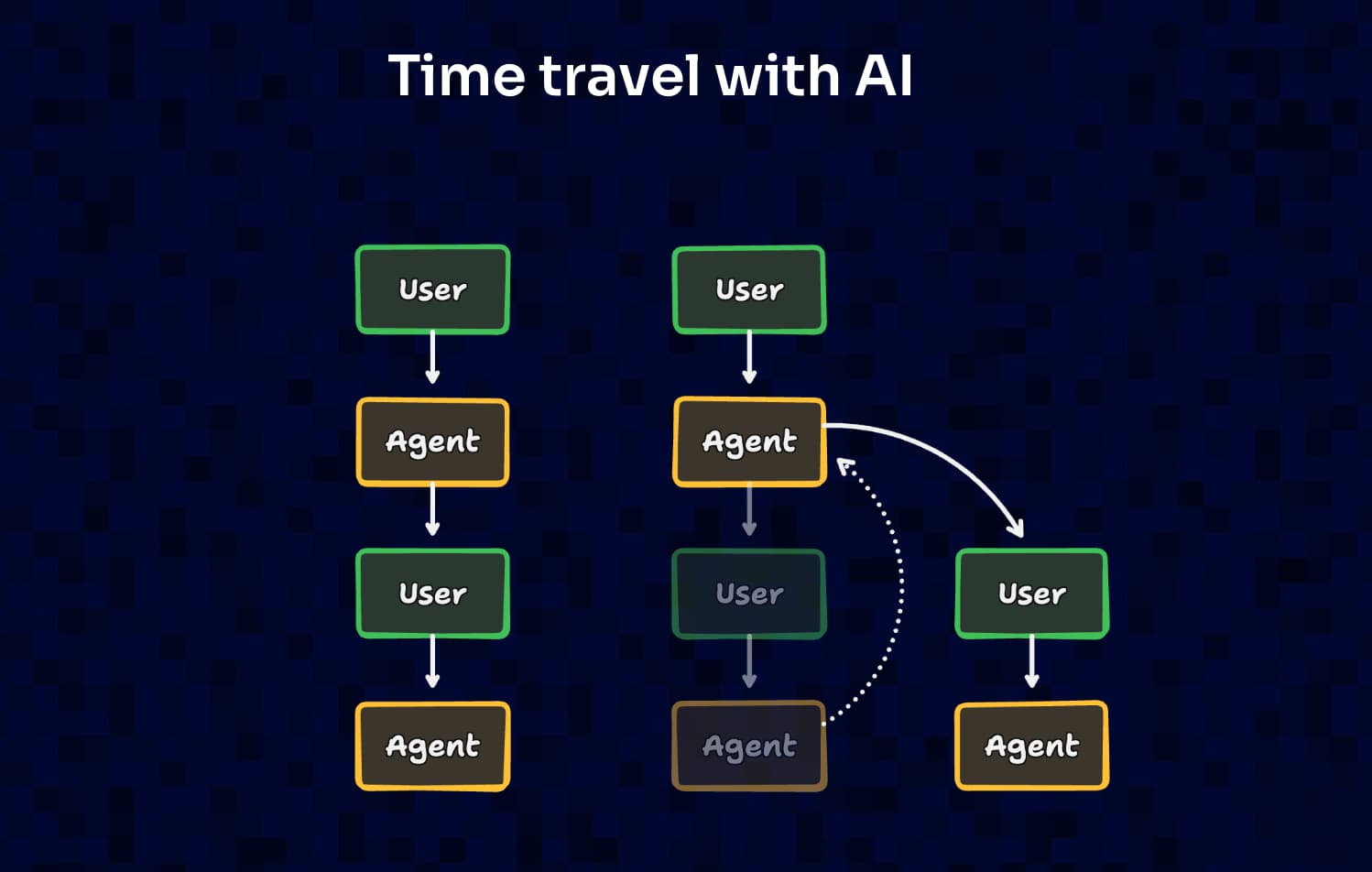
Most agent experiences today still treat conversation like a single straight line. You prompt, the agent responds, you prompt again, and the thread grows turn by turn. It’s familiar and it works… until you hit the moment that happens in every real interaction: you realize you should’ve asked something earlier, or you want to tweak one detail without throwing away everything you’ve done so far. In a typical chat UI, your options are basically to start over or awkwardly correct-course with “actually, ignore that…”
We wanted to try a different model, one that feels closer to how people actually explore. What if you could go back to an earlier point in the conversation, change one prompt, and see a new path unfold from there? That’s what we meant by “time traveling” in the title of our presentation: a way of treating conversation as something you can revisit and branch instead of something you can only scroll through.
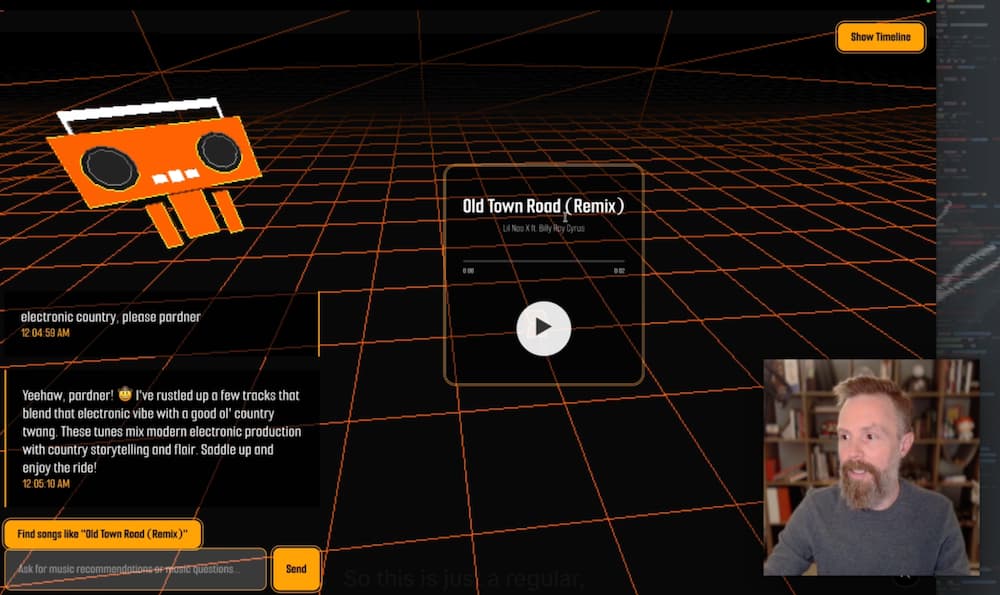
We didn’t want this to look like yet another chat window. We wrapped the whole thing in a playful concept: a DJ music recommendation app in 3D, with a friendly little robot floating in a retro-futuristic space. You could ask it for music by genre, by lyric themes, or by vibe, listen to a song, and then jump back in the timeline to explore a different direction. The UI makes that branching visible, so you can literally see alternate timelines forming as you explore.
The core technical decision: chats are graphs, not lists
Once you decide the user should be able to branch, you can’t store conversation history as a simple list of messages anymore. A list assumes there’s only one “next” message. We needed a structure that supports going backward, jumping around, and creating alternate futures without losing the past. That’s a graph: each conversation turn becomes a node, the transitions become edges, and we keep track of a “current node” that represents where the user is in the experience right now.
That current node is what makes the time travel mechanic work. If we want to go back in time, we set the current node to an earlier point in the graph. If we want to branch, we create a new edge from that past node to a new node representing the updated prompt and response. And if the user wants to jump forward again (ie, back to a different future they already explored) we can simply set the current node to that node. Conceptually it’s simple, but it unlocks a very different UX: you’re not stuck in a single thread, you’re navigating a conversation space.
Keeping it manageable under hackathon constraints
We built this in a single four-hour sprint, which meant every choice had to trade elegance for speed without sacrificing the core idea. The main thing we needed was a clean way to manage the graph state in React, keep updates predictable, and make branching trivial to implement. Once the graph is stable, everything else becomes a rendering problem: the UI can reflect the graph however we want, e.g., as a timeline, a branching tree, a 3D structure, etc., without changing the underlying data model.
Where Algolia fits: fast retrieval from a big music dataset
On the recommendation side, we knew we’d need two different capabilities: fast retrieval when the user’s request maps cleanly to searchable data, and more interpretive suggestions when the request is about mood, vibe, or similarity. For the retrieval part, we indexed a large music dataset into Algolia, including song titles, genres, and lyrics, so we could return relevant results quickly when the user asked for something like “songs about heartbreak” or “songs about robots.”
Algolia’s prebuilt UI components are great when you want a classic search box and results list, but our interface lived inside a 3D scene and needed to behave like a conversation. So we went straight to the client API and wired search results into our own rendering pipeline. That turned out to be a big win: we could keep the weird UI we wanted while still getting the speed and relevance benefits of Algolia under the hood.
Where the LLM fits: the fuzzy, human side of music taste
Of course, not every prompt is “searchable” in a literal sense. People don’t always know the words to ask for what they want; they describe feelings, pacing, context, and taste. “Make it slower.” “Something that feels like driving at night.” “More like what we just heard.” Those are real requests, but they’re not great keyword queries.
So we routed prompts based on intent. If the user was clearly asking for lyrics, genres, or other metadata we’d indexed, we hit Algolia. If the user was asking for something more subjective, we sent the request to an LLM to generate recommendations and returned them in a structured suggestions format that our UI could render consistently. In practice, it was a simple split – Algolia for fast, queryable retrieval, the LLM for interpretive recommendation – but it kept the experience responsive while still feeling “human.”
The 3D layer: React Three Fiber and UI you can step into
To make the whole thing feel like more than a chat app with a gimmick, we leaned into 3D. We built the scene with React Three Fiber (React components for three.js), which gave us a lot of expressive power without abandoning the React mental model. One of the best parts is that you can mix 3D objects with regular HTML and CSS in the same space, so we could render conversation UI elements as familiar, readable components while still placing them inside a world with depth and motion.
The DJ robot itself is just geometry and materials, not an imported model, and we layered a pixelated filter over the scene to land that retro-future vibe. It’s playful, but it’s also functional: the 3D environment is what makes the conversation graph legible at a glance. You can see where you’ve been, where you branched, and where you might go next.
The future of UX isn’t just “chat everywhere.” It’s giving users better ways to explore, revise, and navigate intent over time.
A timeline you can jump through is more than decoration, it changes how safe and usable the system feels.
Instead of being trapped in a single thread, users can treat the interaction like exploration: try something, branch, compare, and keep moving without losing context.
For us, the graph structure and the state-driven UI were the guardrails, and Algolia plus the LLM were the engines powering results.
Put together, it created an experience that felt fast, flexible, and surprisingly close to something we’d want to keep building beyond the 4-hour experiment.











 Other Types


%20(2).svg)